\" plugin_version.type = \"hidden\" form.appendChild(plugin_version) var wordpress_version = document.createElement(\"input\") wordpress_version.name = \"wordpress_version\" wordpress_version.id = \"wordpress_version\" wordpress_version.value = '$wp_version' wordpress_version.type = \"hidden\" form.appendChild(wordpress_version) } },200); "; } else { echo ''; } } else { echo ''; } } else { echo ""; return; } } } /** * Google analytics . */ function ga_footer() { if ( ! ( defined( 'DOING_AJAX' ) && DOING_AJAX ) ) { $banner_discarded_count = get_option( 'sm_beta_banner_discarded_count' ); if ( 1 === $banner_discarded_count || '1' === $banner_discarded_count ) { echo ''; } } } /** * Check if the requirements of the sitemap plugin are met and loads the actual loader * * @package sitemap * @since 4.0 */ function sm_setup() { $fail = false; // Check minimum PHP requirements, which is 5.2 at the moment. if ( version_compare( PHP_VERSION, '5.2', '<' ) ) { add_action( 'admin_notices', 'sm_add_php_version_error' ); $fail = true; } // Check minimum WP requirements, which is 3.3 at the moment. if ( version_compare( $GLOBALS['wp_version'], '3.3', '<' ) ) { add_action( 'admin_notices', 'sm_add_wp_version_error' ); $fail = true; } if ( ! $fail ) { require_once trailingslashit( dirname( __FILE__ ) ) . 'class-googlesitemapgeneratorloader.php'; } } /** * Adds a notice to the admin interface that the WordPress version is too old for the plugin * * @package sitemap * @since 4.0 */ function sm_add_wp_version_error() { /* translators: %s: search term */ echo '

' . esc_html( __( 'Your WordPress version is too old for XML Sitemaps.', 'google-sitemap-generator' ) ) . '
' . esc_html( sprintf( __( 'Unfortunately this release of Google XML Sitemaps requires at least WordPress %4$s. You are using WordPress %2$s, which is out-dated and insecure. Please upgrade or go to active plugins and deactivate the Google XML Sitemaps plugin to hide this message. You can download an older version of this plugin from the plugin website.', 'google-sitemap-generator' ), 'plugins.php?plugin_status=active', esc_html( $GLOBALS['wp_version'] ), 'http://www.arnebrachhold.de/redir/sitemap-home/', '3.3' ) ) . '

'; } /** * Adds a notice to the admin interface that the WordPress version is too old for the plugin * * @package sitemap * @since 4.0 */ function sm_add_php_version_error() { /* translators: %s: search term */ echo '

' . esc_html( __( 'Your PHP version is too old for XML Sitemaps.', 'google-sitemap-generator' ) ) . '
' . esc_html( sprintf( __( 'Unfortunately this release of Google XML Sitemaps requires at least PHP %4$s. You are using PHP %2$s, which is out-dated and insecure. Please ask your web host to update your PHP installation or go to active plugins and deactivate the Google XML Sitemaps plugin to hide this message. You can download an older version of this plugin from the plugin website.', 'google-sitemap-generator' ), 'plugins.php?plugin_status=active', PHP_VERSION, 'http://www.arnebrachhold.de/redir/sitemap-home/', '5.2' ) ) . '

'; } /** * Returns the file used to load the sitemap plugin * * @package sitemap * @since 4.0 * @return string The path and file of the sitemap plugin entry point */ function sm_get_init_file() { return __FILE__; } /** * Register beta user consent function. */ function register_consent() { if ( ! ( defined( 'DOING_AJAX' ) && DOING_AJAX ) ) { if ( is_user_logged_in() && current_user_can( 'manage_options' ) ) { if ( isset( $_POST['user_consent_yes'] ) ) { if (isset($_POST['user_consent_yesno_nonce_token']) && check_admin_referer('user_consent_yesno_nonce', 'user_consent_yesno_nonce_token')){ update_option( 'sm_user_consent', 'yes' ); } } if ( isset( $_POST['user_consent_no'] ) ) { if (isset($_POST['user_consent_yesno_nonce_token']) && check_admin_referer('user_consent_yesno_nonce', 'user_consent_yesno_nonce_token')){ update_option( 'sm_user_consent', 'no' ); } } if ( isset( $_GET['action'] ) ) { if ( 'no' === $_GET['action'] ) { if ( $_SERVER['QUERY_STRING'] ) { if( strpos( $_SERVER['QUERY_STRING'], 'google-sitemap-generator' ) ) { update_option( 'sm_show_beta_banner', 'false' ); $count = get_option( 'sm_beta_banner_discarded_count' ); if ( gettype( $count ) !== 'boolean' ) { update_option( 'sm_beta_banner_discarded_count', (int) $count + 1 ); } else { add_option( 'sm_beta_banner_discarded_on', gmdate( 'Y/m/d' ) ); update_option( 'sm_beta_banner_discarded_count', (int) 1 ); } GoogleSitemapGeneratorLoader::setup_rewrite_hooks(); GoogleSitemapGeneratorLoader::activate_rewrite(); } else { add_option( 'sm_beta_notice_dismissed_from_wp_admin', 'true' ); } } else { add_option( 'sm_beta_notice_dismissed_from_wp_admin', 'true' ); } } } if ( isset( $_POST['enable_updates'] ) ) { if (isset($_POST['enable_updates_nonce_token']) && check_admin_referer('enable_updates_nonce', 'enable_updates_nonce_token')){ if ( 'true' === $_POST['enable_updates'] ) { $auto_update_plugins = get_option( 'auto_update_plugins' ); if ( ! is_array( $auto_update_plugins ) ) { $auto_update_plugins = array(); } array_push( $auto_update_plugins, 'google-sitemap-generator/sitemap.php' ); update_option( 'auto_update_plugins', $auto_update_plugins ); } elseif ( 'false' === $_POST['enable_updates'] ) { update_option( 'sm_hide_auto_update_banner', 'yes' ); } } } /* if ( isset( $_POST['disable_plugin'] ) ) { if (isset($_POST['disable_plugin_sitemap_nonce_token']) && check_admin_referer('disable_plugin_sitemap_nonce', 'disable_plugin_sitemap_nonce_token')){ if ( strpos( $_POST['disable_plugin'], 'all_in_one' ) !== false ) { $default_value = 'default'; $aio_seo_options = get_option( 'aioseo_options', $default_value ); if ( $aio_seo_options !== $default_value ) { $aio_seo_options = json_decode( $aio_seo_options ); $aio_seo_options->sitemap->general->enable = 0; update_option( 'aioseo_options', json_encode( $aio_seo_options ) ); } } elseif( strpos( $_POST['disable_plugin'], 'wp-seo' ) !== false ) { $yoast_options = get_option( 'wpseo' ); $yoast_options['enable_xml_sitemap'] = false; update_option( 'wpseo', $yoast_options ); } } } */ } } $updateUrlRules = get_option('sm_options'); if(!isset($updateUrlRules['sm_b_rewrites2']) || $updateUrlRules['sm_b_rewrites2'] == false){ GoogleSitemapGeneratorLoader::setup_rewrite_hooks(); GoogleSitemapGeneratorLoader::activate_rewrite(); GoogleSitemapGeneratorLoader::activation_indexnow_setup(); if (isset($updateUrlRules['sm_b_rewrites2'])) { $updateUrlRules['sm_b_rewrites2'] = true; update_option('sm_options', $updateUrlRules); } else { $updateUrlRules['sm_b_rewrites2'] = true; add_option('sm_options', $updateUrlRules); update_option('sm_options', $updateUrlRules); } } if(isset($updateUrlRules['sm_links_page'] )){ $sm_links_page = intval($updateUrlRules['sm_links_page']); if($sm_links_page < 1000) { $updateUrlRules['sm_links_page'] = 1000; update_option('sm_options', $updateUrlRules); } } if(!isset($updateUrlRules['sm_b_activate_indexnow']) || $updateUrlRules['sm_b_activate_indexnow'] == false){ $updateUrlRules['sm_b_activate_indexnow'] = true; $updateUrlRules['sm_b_indexnow'] = true; update_option('sm_options', $updateUrlRules); } } function disable_plugins_callback(){ if (current_user_can('manage_options')) { check_ajax_referer('disable_plugin_sitemap_nonce', 'nonce'); $pluginList = sanitize_text_field($_POST['pluginList']); $pluginsToDisable = explode(',', $pluginList); foreach ($pluginsToDisable as $plugin) { if ($plugin === 'all-in-one-seo-pack/all_in_one_seo_pack.php') { /* all in one seo deactivation */ $aioseo_option_key = 'aioseo_options'; if ($aioseo_options = get_option($aioseo_option_key)) { $aioseo_options = json_decode($aioseo_options, true); $aioseo_options['sitemap']['general']['enable'] = false; update_option($aioseo_option_key, json_encode($aioseo_options)); } } if ($plugin === 'wordpress-seo/wp-seo.php') { /* yoast sitemap deactivation */ if ($yoast_options = get_option('wpseo')) { $yoast_options['enable_xml_sitemap'] = false; update_option('wpseo', $yoast_options); } } if ($plugin === 'jetpack/jetpack.php') { /* jetpack sitemap deactivation */ $modules_array = get_option('jetpack_active_modules'); if(is_array($modules_array)) { if (in_array('sitemaps', $modules_array)) { $key = array_search('sitemaps', $modules_array); unset($modules_array[$key]); update_option('jetpack_active_modules', $modules_array); } } } if ($plugin === 'wordpress-sitemap') { /* Wordpress sitemap deactivation */ $options = get_option('sm_options', array()); if (isset($options['sm_wp_sitemap_status'])) $options['sm_wp_sitemap_status'] = false; else $options['sm_wp_sitemap_status'] = false; update_option('sm_options', $options); } } echo 'Plugins sitemaps disabled successfully'; wp_die(); } } function conflict_plugins_admin_notice(){ GoogleSitemapGeneratorLoader::create_notice_conflict_plugin(); } /* send to index updated url */ function indexnow_after_post_save($new_status, $old_status, $post) { $indexnow = get_option('sm_options'); $indexNowStatus = isset($indexnow['sm_b_indexnow']) ? $indexnow['sm_b_indexnow'] : false; if ($indexNowStatus === true) { $newUrlToIndex = new GoogleSitemapGeneratorIndexNow(); $is_changed = false; $type = "add"; if ($old_status === 'publish' && $new_status === 'publish') { $is_changed = true; $type = "update"; } else if ($old_status != 'publish' && $new_status === 'publish') { $is_changed = true; $type = "add"; } else if ($old_status === 'publish' && $new_status === 'trash') { $is_changed = true; $type = "delete"; } if ($is_changed) $newUrlToIndex->start(get_permalink($post)); } } // Don't do anything if this file was called directly. if ( defined( 'ABSPATH' ) && defined( 'WPINC' ) && ! class_exists( 'GoogleSitemapGeneratorLoader', false ) ) { sm_setup(); if(isset(get_option('sm_options')['sm_wp_sitemap_status']) ) $wp_sitemap_status = get_option('sm_options')['sm_wp_sitemap_status']; else $wp_sitemap_status = true; if($wp_sitemap_status = true) $wp_sitemap_status = '__return_true'; else $wp_sitemap_status = '__return_false'; add_filter( 'wp_sitemaps_enabled', $wp_sitemap_status ); add_action('wp_ajax_disable_plugins', 'disable_plugins_callback'); add_action('admin_notices', 'conflict_plugins_admin_notice'); } Website – Affiliate Marketing Programs | CBOMO.COM https://cbomo.com Your Affiliate Online Money Opportunities Thu, 13 Jun 2024 16:56:10 +0000 en-US hourly 1 https://wordpress.org/?v=6.9.4 4 Ways to Find An RSS Feed URL for Any Website https://cbomo.com/4-ways-to-find-an-rss-feed-url-for-any-website/ https://cbomo.com/4-ways-to-find-an-rss-feed-url-for-any-website/#respond Thu, 13 Jun 2024 16:56:10 +0000 https://cbomo.com/4-ways-to-find-an-rss-feed-url-for-any-website/ [ad_1]

Need to find an RSS feed URL for a website?

RSS feeds are useful for a variety of reasons, from staying up-to-date on everything that a website publishes to promoting your content via social media scheduling tools like Hootsuite, Buffer, etc. Using an RSS feed reader can help you stay updated on content from your favorite websites by organizing information in one place. RSS readers can be used to access feeds from different CMS platforms, making it easier to monitor multiple websites for new content in a single news aggregator.

Since it can be difficult to figure out the RSS feed URL for a website, we created this post to show you where they hide on some of the most popular website CMS platforms such as WordPress, Drupal, and Expression Engine.

Even if you aren’t sure what CMS technology a website is using these tips will help you better understand the world of RSS feeds and syndication, and help you find an RSS feed. So let’s get started.

What is an RSS feed?

A web feed, such as an RSS (Really Simple Syndication), is a simple text file of content on your website that automatically updates when new content is added. RSS feeds are universally supported in web standards and allow applications and users to follow updates from a website’s content.

What does an RSS feed look like?

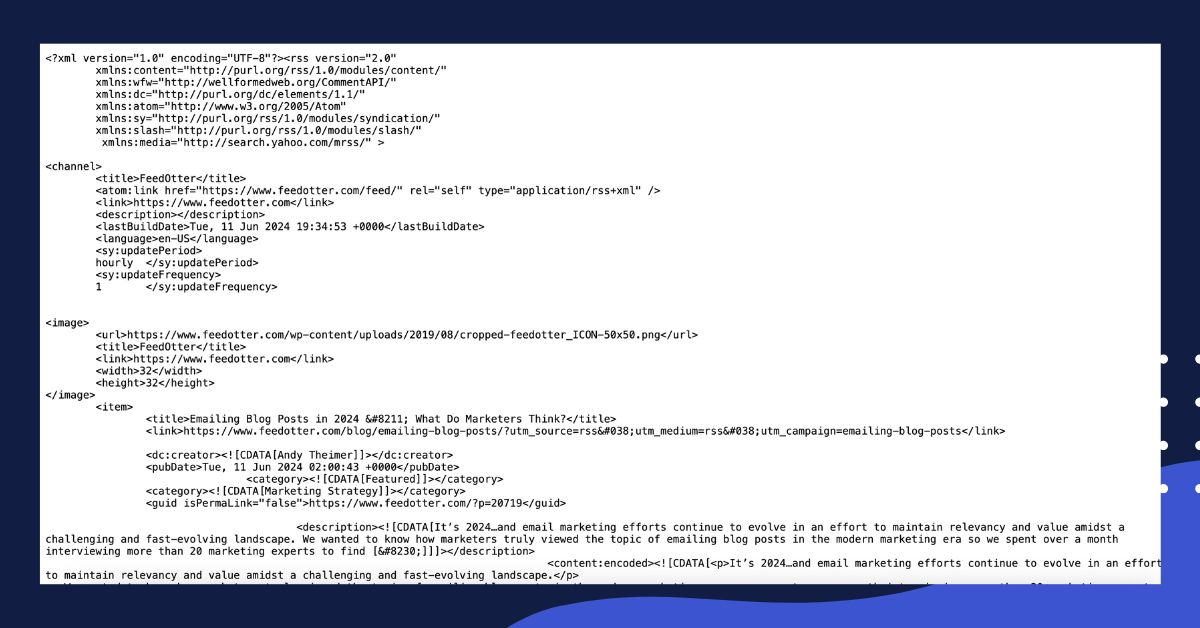
RSS feeds are “Nodes” that show title, description, images, links, published date, etc. When you access

RSS feeds show title, description, images, links, published date, etc. The RSS icon helps users easily identify and access these feeds on websites. Here’s an example of the FeedOtter RSS feed.

Common RSS feed URLs

Many websites have a feed tag that can be appended to the base URL. You can often obtain a website’s RSS feed by appending the most common RSS links to the website’s URL:

  • www.example.com/feed
  • www.example.com/rss
  • www.example.com/rss.xml

Some websites also include an RSS feed icon located near the social icons on a page. Clicking on this icon should take you to the RSS feed.

How to Find an RSS Feed on Popular Website Platforms

1. Find the RSS feed of a WordPress website

The WordPress CMS powers more than 43% of the internet, so if you’re trying to find an RSS feed of a website, your best bet is to assume the site is WordPress and try the following options:

Add “/feed/” to the end of the website URL

This is one of the most common RSS URLs, which can be found by taking a website’s URL https://www.feedotter.com and appending /feed/ so that it becomes https://www.feedotter.com/feed/.

Add “/rss/” to the end of the website URL

While not as common as “feed,” some sites will cough up the RSS feed URL when you append “RSS” to the end of the URL as well. If the first option doesn’t work, this is a good second tactic to try.

Find an RSS feed URL for a particular category or tag of content

By default, WordPress creates RSS feeds for everything, so you can also find RSS feeds for various categories and tags of content. Here is an example of how to find category and tag content on a WordPress site.

To find an RSS feed URL that contains only content from a specific category the URL would look like:

https://www.feedotter.com/blog/category/email-marketing/feed/

In this example, the category is ‘content-creation’ and the standard WordPress trick applies of “adding /feed/ to the end of things” gives you an RSS feed URL. You can use this same process to find an RSS feed for a tag.

Looking for more info? This article has even more great tips and references for where to find an RSS URL in WordPress. A highly recommended read.

2. Find an RSS feed via website source code

Looking at the HTML source code of a web page is another great way to quickly find the RSS feed. You can use an RSS reader to access the feeds found in the source code.

Let’s navigate to Hubspot’s marketing blog at https://blog.hubspot.com/marketing

Right-click on the website’s page, and choose Page Source. In the new window that appears, use the “find” feature (Ctrl + F on a PC or Command + F on a Mac), and type in RSS.

In this case, the correct RSS feed is https://blog.hubspot.com/marketing/rss.xml

Note: It is very common for websites to offer a second RSS feed full of blog comments.  These are typically not useful, so be careful to skip any feed URLs that have the word ‘comments’ in their tag.

3. Finding an RSS feed URL for Joomla, Drupal, and Magento websites

While WordPress powers much of the web, there are several other CMS systems that are less RSS-friendly. A quick look at the market share of most used CMS platforms reveals that Joomla, Drupal, and Magento all power significant parts of the web.

Finding an RSS feed URL for Joomla, Drupal, and Magento websites

Unfortunately, these CMS systems don’t enable RSS by default which means the site operator must explicitly create or enable an RSS feed that displays some or all of the site’s content. If you know your website is running Joomla, Drupal, or Magento your best bet is to examine the source code of key pages (homepage, blog page, newsroom) and search for “RSS.”

If you are reading this and working on your own website, you may need to ask your website developer to enable and/or create an RSS feed for you. Here are several steps to help you create custom RSS feeds should this be your objective:

How to Create an RSS feed URL for your Drupal 8 website

This great video walkthrough of how to create RSS feeds in Drupal is quite helpful and illustrates how to turn any bit of Drupal content into a custom RSS feed. To write RSS feeds in Drupal, you need to understand the history and evolution of the RSS format, including its origins, development of different versions, and the involvement of key individuals and groups.

Create an RSS feed URL for your Joomla website

For Joomla, it is recommended to install an RSS plugin such as gsRSSFeed. This plugin will make setting up an RSS feed in Joomla as simple as possible.

  • Step 1: Go to the RSS Feeds section on Joomla.org.
  • Step 2: Download gsRSSFeed or another plugin of your choosing.
  • Step 3: Install gsRSSFeed via the Joomla installer.
  • Step 4: Go to Components >> gsRSSFeed and click “New”
  • Step 5: Fill in the information requested. Most of these fields are self-explanatory. You can happily just give your feed a name and click save.

Create an RSS feed URL for your Magento website:

Magento is an online storefront CMS used for eCommerce. Magento has some great RSS functionality built-in and excellent documentation on how to create custom RSS feeds, such as:

eCommerce RSS feeds are super useful and can be used to tell customers about new products, specials, or even automate product-filled newsletters using a tool like FeedOtter.

4. Find an RSS feed for Expression Engine websites

While not holding a significant percentage of market share, the CMS Expression Engine is one of the most popular among business websites.

These resources will help you set up RSS for ExpressionEngine:

5. Squarespace RSS Feeds

Squarespace standardizes their RSS feed URLs, so any RSS feed from a website built on Squarespace can be found by adding the full URL, followed by the page slug, and ending with ?format=rss

Key Takeaways

While most sites on the web have an RSS feed to help promote and syndicate their content, it is not always the case.

Hopefully, this guide provides some insight into where RSS feeds most commonly reside and how to set them up if you’re working on your own website and how to find an RSS feed.

[ad_2]

Source link

]]>
https://cbomo.com/4-ways-to-find-an-rss-feed-url-for-any-website/feed/ 0
5 Tips To Increase Website Traffic After The Google Algo Update https://cbomo.com/apiclick-aspxreffexrssaidtid66676d552d124ae3a91f83dc7208a271urlhttps%3a%2f%2fwww-searchenginejournal-com%2fgoogle-update-increase-traffic-stay22-spa%2f516972%2fc6985782381283715479mkten-us/ https://cbomo.com/apiclick-aspxreffexrssaidtid66676d552d124ae3a91f83dc7208a271urlhttps%3a%2f%2fwww-searchenginejournal-com%2fgoogle-update-increase-traffic-stay22-spa%2f516972%2fc6985782381283715479mkten-us/#respond Mon, 10 Jun 2024 21:17:11 +0000 https://cbomo.com/apiclick-aspxreffexrssaidtid66676d552d124ae3a91f83dc7208a271urlhttps%3a%2f%2fwww-searchenginejournal-com%2fgoogle-update-increase-traffic-stay22-spa%2f516972%2fc6985782381283715479mkten-us/ [ad_1]

This post was sponsored by Stay22. The opinions expressed in this article are the sponsor’s own.

The latest Google update hit our partners – travel bloggers – hard. Despite the challenges presented by this update, we are amazed by their resilience.

Although we cannot influence Google, we can definitely take charge of the things within our reach.

Here are five travel blogger-tested ways to increase website traffic after the latest Google update.

Get the most out of each visitor. Check out our guide, Ten Tips for Maximizing Revenue for Travel Bloggers.

1. Use Pinterest As An Additional Search Engine

Many people think of Pinterest as a social media platform, but it functions much more as a search engine.

Pinterest’s tools make it a fantastic way to get visitors to your website.

How To Get Started With Pinterest

  1. Create a new business account or link/convert a personal account to gain access to business tools like Pinterest Business Hub and Pinterest Analytics, which allow you to monitor searches and keywords.
  2. Write a catchy bio for your profile. If you have niche keywords you use on your website, include them here.
  3. Claim your website, allowing you to track whenever someone shares your website content on Pinterest. Additionally, it will automatically include your Pinterest profile and a follow button so you can attract more visitors.

How To Use Pinterest Like A Pro

Pinterest is built around pictures, so having great visuals is critical. You want to make yours stand out on the page.

  1. When you travel, snap many pictures and pick the best ones later.
  2. Use design tools like Canva to add text, create interesting layouts, and add branding elements.
  3. Create boards to organize your content into categories, such as by destination or blog post type.
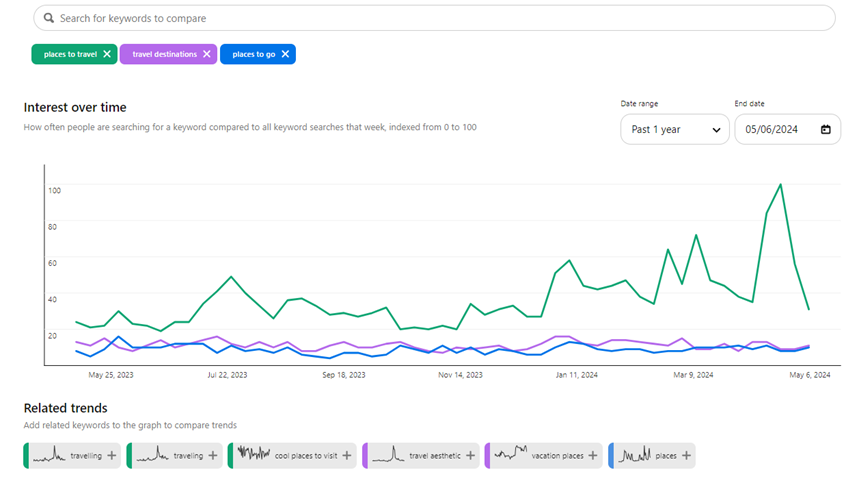
  4. Just like any other search engine, keyword research is necessary on Pinterest. Use business tools like Pinterest Trends, which lets you see keyword search volume and which pins are most popular for them.
  5. Use your selected keywords everywhere possible, including pin titles, pin descriptions, and board descriptions.
Screenshot from Pinterest Trends, June 2024

Before you start pinning, optimize your blog posts to maximize revenue to ensure every visitor counts. See how to do that in our guide Ten Tips for Maximizing Revenue for Travel Bloggers.

2. Keep Visitors Engaged With Email Marketing

Email marketing is important because you own it. Instagram could ban your account, Google can derank you, but your email list is always yours.

Use this strategy to build less volatile, consistent traffic instead of new traffic.

How To Get Started With Email Marketing

  1. Select an email marketing provider. Travel bloggers love MailerLite and MailChimp because they are low-cost and simple.
  2. Start collecting email addresses. Create a mailing list signup form with your website host and insert it at the end of posts to collect your readers’ information.

How To Use Email Marketing Like A Pro

  1. Create a lead magnet that entices readers to share their information in exchange for it. Popular lead magnets in the travel blogging community are travel guides, ebooks, and itineraries.
  2. The goal of email is to get your reader onto your site. Keep your emails short and include impressive pictures and a clear link to your website. Leave them wanting more so that they click through.
  3. Before sending an email directing traffic to one of your pages, ensure the page is set up to maximize revenue. See how in our guide, Ten Tips for Maximizing Revenue for Travel Bloggers.

“While SEO is often touted as the king of traffic, good email marketing is the absolute queen. We regularly see spikes in our web analytics when we email our audience, but those spikes aren’t just temporary. They help our users build habits. We simply wouldn’t have nearly the business we have today without activating our email list.”

Beth Stanos, Wanderful CEO & Founder

    3. Add Your Content To Flipboard To Grab More Website Visits

    Flipboard is an article curation website that lets users flip through articles from different publications, like magazines.

    How To Get Started With Flipboard

    1. Download the Flipboard app on mobile and create an account and profile.
    2. Create Flipboard magazines. These are topic categories that group your content (much like Pinterest boards).
    3. Add your blog posts to them from the magazine page on Flipboard or the Flipit Chrome bookmark.
    Screenshot taken from Flipboard, June 2024

    How To Use Flipboard Like A Pro

    1. Add your fresh blog posts to Flipboard right after publishing.
    2. Add relevant content to your magazines that isn’t your own. Engaging with other bloggers’ content and maintaining new content in your magazines helps your reach.
    3. Include your target keywords in your magazine descriptions, post captions, and profile.

    “Flipboard has become a major traffic source for all 3 of my websites. They have fantastic tools for creators, like storyboards, scheduling, and RSS feeds for magazines, making creating and sharing compelling content easy.”

    Amanda O’Brien, theboutiqueadventurer.com Founder

    4. Get Discovered With Short-Form Videos On Social Media

    Did you know 77% of travelers use social media when planning their trips? Get their eyes on your content with short-form videos on platforms like TikTok, Instagram, and YouTube shorts.

    These platforms have algorithms to serve your content to people who don’t follow you, making them ideal for readers to discover you.

    How To Get Started Making Videos

    1. Create your accounts on YouTube, Instagram, and TikTok.
    2. Download Capcut, a free mobile app for video editing. It’s better than the in-app editing functionality, with pre-installed templates and effects.
    3. Create a Linktree account or an alternative. All three platforms make it difficult for users to leave and visit your site, so a place where users can go for all your links is necessary.
    “PLACES ON EARTH WITH THE BLUEST WATER” by @thetravelshack, June 2024

    How To Make Short Video Content Like A Pro

    1. While traveling, keep video creation in the back of your mind. When you see eye-catching scenery or an interesting environment, be ready to capture it in video. Your video’s “wow” factor differentiates between a mediocre and a fantastic video.
    2. On Instagram, write detailed captions. On YouTube and TikTok, keep captions as brief as possible.
    3. Voice-over, on-screen text, and music are crucial to your engagement rate. You can add these with Capcut or in-app.
    4. Pick your video thumbnails carefully. Make sure they stand out in a grid of other videos.
    5. Finally, keep your short video short. The ideal length for a Reel is seven to eleven seconds, a TikTok 21 to 34 seconds, and a YouTube Short 25 to 35 seconds.

    “TikTok helped us to get our second blog on Mediavine. We shared detailed videos about “how to do something” and always included a call to action, directing viewers to our blog for more information. In recent years, we’ve had videos go viral while encouraging followers to visit the link in our bio. This has resulted in thousands of clicks to our websites.”

    Natasha Alden, theworldpursuit.com Co-Founder

    5. Expose Yourself To New Audiences With Guest Posting

    Having your writing published on another website gives you access to a whole new audience, making it an excellent strategy for attracting new readers.

    How To Start Guest Posting

    1. Find places that accept guest posts. Many publications have open submissions that you can submit to.
    2. If you see a site that has guest posts but no open submissions, find their contact information and send an inquiry email.
    3. Create a pitch by explaining your travel expertise and provide writing samples.

    How To Guest Post Like A Pro

    1. When creating your pitch, understand the site’s needs. What content gaps do they have? Focus your pitch there.
    2. Organic guest posting opportunities arise if you take the time to network. Meeting and developing friendships with travel bloggers is a great way to share audiences. You can network on social media, as well as in-person events like TBEX, TravelCon, and Traverse.
    3. Create a clear link back to your blog and include a catchy description so readers will be enticed to read more of your content.
    4. Strategize by monitoring the traffic of potential sites with tools like SEMRush and pick the best option.
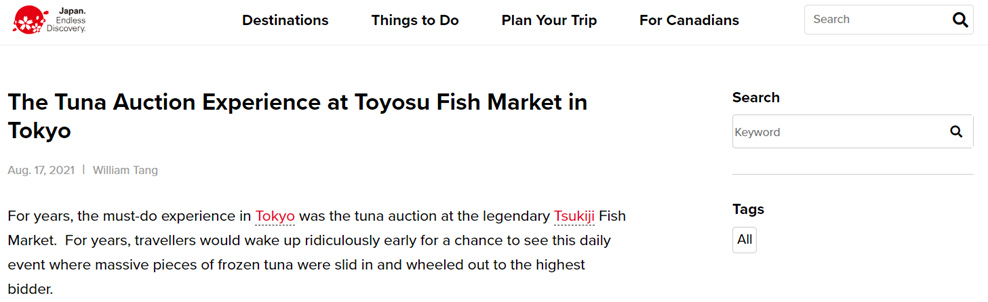
    Screenshot from japan.travel, June 2024

    “Creating content for another publication to share as a standalone article allows you to share new expertise about a certain area. Whether through the article itself or subsequent social shares, a new audience gets exposure to you as a writer.”

    William Tang, goingawesomeplaces.com Founder

    See how William Tang made travel blogging his full-time job with the help of Stay22’s revenue-boosting tools. Read the case study.

    Compensate For Traffic Dips By Maximizing Your Revenue.

    Maximize your conversions with strategic CTA placement and Stay22’s cutting-edge AI-powered affiliate tools! Skyrocket your affiliate sales with these proven tips:

    DOWNLOAD OUR GUIDE: Ten Tips for Maximizing Revenue for Travel Bloggers.


    Image Credits

    Featured Image: Image by Shutterstock. Used with permission.

    [ad_2]

    Source link

    ]]>
    https://cbomo.com/apiclick-aspxreffexrssaidtid66676d552d124ae3a91f83dc7208a271urlhttps%3a%2f%2fwww-searchenginejournal-com%2fgoogle-update-increase-traffic-stay22-spa%2f516972%2fc6985782381283715479mkten-us/feed/ 0
    Casino Stake Affiliate Website is Launched https://cbomo.com/casino-stake-affiliate-website-is-launched/ https://cbomo.com/casino-stake-affiliate-website-is-launched/#respond Fri, 22 Mar 2024 20:26:04 +0000 https://cbomo.com/casino-stake-affiliate-website-is-launched/ [ad_1]

    We use technologies like cookies to store and/or access device information. We do this to improve browsing experience and to show personalised ads. Consenting to these technologies will allow us to process data such as browsing behaviour or unique IDs on this site. Not consenting or withdrawing consent, may adversely affect certain features and functions.

    The technical storage or access is strictly necessary for the legitimate purpose of enabling the use of a specific service explicitly requested by the subscriber or user, or for the sole purpose of carrying out the transmission of a communication over an electronic communications network.

    The technical storage or access is necessary for the legitimate purpose of storing preferences that are not requested by the subscriber or user.

    The technical storage or access that is used exclusively for statistical purposes.
    The technical storage or access that is used exclusively for anonymous statistical purposes. Without a subpoena, voluntary compliance on the part of your Internet Service Provider, or additional records from a third party, information stored or retrieved for this purpose alone cannot usually be used to identify you.

    The technical storage or access is required to create user profiles to send advertising, or to track the user on a website or across several websites for similar marketing purposes.

    [ad_2]

    Source link

    ]]>
    https://cbomo.com/casino-stake-affiliate-website-is-launched/feed/ 0
    How To Create A Website For Affiliate Marketing – Forbes Advisor INDIA https://cbomo.com/apiclick-aspxreffexrssaidtid65f2852625114a7eaa428388340a7cefurlhttps%3a%2f%2fwww-forbes-com%2fadvisor%2fin%2fbusiness%2fsoftware%2fhow-to-create-website-for-affiliate-marketing%2fc1469128996/ https://cbomo.com/apiclick-aspxreffexrssaidtid65f2852625114a7eaa428388340a7cefurlhttps%3a%2f%2fwww-forbes-com%2fadvisor%2fin%2fbusiness%2fsoftware%2fhow-to-create-website-for-affiliate-marketing%2fc1469128996/#respond Thu, 14 Mar 2024 05:03:36 +0000 https://cbomo.com/apiclick-aspxreffexrssaidtid65f2852625114a7eaa428388340a7cefurlhttps%3a%2f%2fwww-forbes-com%2fadvisor%2fin%2fbusiness%2fsoftware%2fhow-to-create-website-for-affiliate-marketing%2fc1469128996/ [ad_1]

    If you’re willing to get into affiliate marketing, creating a website can help you streamline the process. It doesn’t matter whether you’re a beginner, as with advanced website builders and free hosting plans, it’s easier to create an affiliate marketing website than ever.

    However, like any other business or job, creating and running an affiliate marketing website requires planning and consistency. Before diving into the steps for building a website, we’ll go through some basic concepts for those getting started. 

    What is Affiliate Marketing?

    In our day-to-day lives, we recommend several products and services to our friends or family members, right? It could be the restaurant you visited last week or a new e-commerce platform that sells oversized t-shirts with funky designs. 

    In a way, you’re helping the business gain another customer, and that’s exactly what affiliate marketing is, except the recommendation takes place online, through a video, social media post, or a website, and you get paid for the recommendation.

    Creative analogies aside, here’s what the affiliate marketing process actually entails. First, you select a brand’s specific product, then join their affiliate program to promote it online. Whenever someone buys the product through your affiliate link, you get a small commission, and that’s it. 

    Why Do You Need a Website for Affiliate Marketing?

    It’s easy to begin an affiliate marketing business. However, as you collaborate with more brands and add more products to your portfolio, managing all the different links becomes difficult, primarily if you operate on a social media account or a video-sharing platform.

    Having your website helps you streamline your affiliate portfolio. Keeping all the products and buying links in one place saves you time. Further, having a well-managed website with elaborate product descriptions and ratings helps you create credibility, drive traffic, and diversify without hassle.

    Now that we’ve revised these concepts let’s start with the steps required to create a website that will help you generate an income stream in 2024. 

    Steps To Create a Website for Affiliate Marketing

    Choose a Genre

    The first thing that you need to do is find yourself a genre or a niche, which will, in turn, help you promote the products that you like. Try to come up with something of genuine interest, as this enables you to sustain the venture for the long term without feeling burdened. This will also help you connect and sell to a particular audience looking for similar products. 

    For instance, if you like traveling, you can create a fantastic affiliate website around related products, such as airline tickets, accommodation, car rentals, extreme weather gear, and other readily available accessories. Similarly, if you like smartphones, you can affiliate a dozen products, like screen guards, phone covers, headphones, power banks, chargers, cables, etc. 

    Along with finding the niche that interests you, you should also put some time into determining the profitability and the market trends. Once you’re through with the genre, start finding platforms that collaborate with affiliate marketers. Considering the examples given above, Booking.com, Skyscanner, and Amazon could be excellent affiliate partners.

    • Find a niche that interests you.
    • Conduct online research to find out the related products and services.
    • Figure out the correct affiliate partners.
    • Sign up for their affiliate marketing programs.

    Decide Which Type of Website You Wish to Build

    Once you’ve picked up a genre for yourself, the next thing is determining the type of website you wish to run. The easiest way is to start a blogging website around the topic and find meaningful anchors to place the affiliate links. However, you can create a simple retail listing website if you don’t want to write detailed blogs. Both of these methods are beginner-friendly and require very little investment. 

    However, if you’re confident about your skills and you already have an excellent reputation among brands, you can create a review website where you post in-depth reviews. On the other hand, if you’re into website designing and have what it takes to handle a slightly complex back-end, you can go for a product/price comparison website, too. 

    • Blog or retail websites are easier to maintain and update than comparison websites with an extensive database.

    Buy a Relevant Domain and Hosting Service

    Once you’ve decided on the type of products you wish to sell, creating a domain name becomes easy. Brainstorm upon several ideas and check their availability on domain name aggregators. The domain name should contain a keyword that is related to your niche.

    For example, if I want to start a blog around traveling in India, “theindiantraveller” could be a good domain name, mainly because it contains all the keywords. Upon checking on GoDaddy, I found that the domain is available for INR 699 yearly with a “.in” extension. Similarly, you can use the domain aggregator of choice to get the required domain name.

    The next thing you need to do is choose a hosting service. Most affiliate websites can use a Shared hosting plan, which is affordable and effective. You can select from several hosting providers, such as Shopify, Squarespace, WordPress, etc. Several hosting providers have dedicated online selling plans and website builders.

    For example, the Bluehost Plus WordPress hosting plan costs INR 279 per month for a 36-month term. It provides hosting for unlimited websites, unmetered SSD storage and bandwidth, and a complimentary domain name for one year. However, this remains an example, and you can purchase whichever hosting service you deem suitable for your affiliate marketing vision.

    • Get the required domain name from a trusted aggregator.
    • Decide which hosting service you require based on the additional services and features.
    • Look out for AI website builders while getting the hosting plans, as they are beneficial. 

    Create a Crisp and Appealing Website

    Given that the main objective of your website is to encourage users to purchase the recommended items, ensure that the overall theme, such as the background color, the font style/size, the placement of buying links, and the overall look of the website goes with each other. 

    Since most hosting service providers now offer AI-based website designing tools and customizable templates, it has never been easier to set up a website from scratch. One pro tip is to go through several websites in your niche and get an idea of their design language. You can always experiment with a new theme, but it should be easy to follow.

    Start Planning Content

    Once you’re done with the domain name and hosting services, familiarize yourself with the publishing process, as you’d have to do it repeatedly. Most content management systems (CMS) are beginner-friendly. 

    However, if you’re having trouble figuring things out, consider going through detailed YouTube crash courses. These videos often contain all the details you need, from how to publish content to managing the CMS, scheduling posts, uploading images, videos, etc.

    The type of content you publish is also important, given that it will help you create a hold on your audience and establish credibility. For instance, you can curate several travel blogs around topics like “things to keep in mind,” “five essential items that you need,” “best waterproof trekking shoes,” and more. 

    Making an editorial calendar helps you keep track of the blogs or retail listings you wish to create and your ongoing progress. As we mentioned, be consistent with the blogs or the retail listings.

    • Familiarize yourself with the CMS.
    • Create a content calendar for yourself.
    • Be consistent with the posts or the retail listings.

    Add Affiliate Links to Your Website

    Once you have a couple of posts ready, it’s time to place the affiliate links you’ve procured from affiliate partners. Most modern programs provide a catalog of products you can promote through your website. Generally, you must copy the affiliate link with your credentials and embed it in the blog post or create a retail listing.

    Different affiliate programs work differently, so the purpose of placing the links differs. For instance, if you only wish to redirect a potential customer from your blog to an aggregator website, a text embed mostly works. However, if the purpose of the link is to make a sale, you might want to create appealing “Buy Now” buttons or product listings that contain high-quality images.

    Drive Traffic to Your Site Through SEO

    There are several ways to drive traffic to your website. The most common way is search engine optimization (SEO), which is not just about optimizing the blogs you’re writing but also helps you develop relevant ideas that are trending and might help you gather a larger audience. 

    You can use tools like Google Keyword Planner, Ahrefs Free Keyword Generator, or Moz Keyword Explorer for basic keyword research. Use these platforms to learn about the current search trends and the trending/related keywords. Then, put those keywords in your blogs’ descriptions, subheads, and main text.

    For instance, entering the keyword “travel” of Ahrefs Free Keyword Generator suggests a huge search volume for related keywords like “travel bag.” One can now create a blog post based on the keyword, listing five travel bags from their affiliate portfolio. 

    • Conducting keyword research helps you find relevant topics, products and gather an audience for your affiliate website.

    Use Social Media to Boost Traffic and Sales

    You can also use other tools like YouTube Shorts or Instagram Reels to redirect traffic to your affiliate website and boost sales. For instance, if you’ve come across an excellent travel bag and you wish to promote the product on social platforms, get the bag, create a compelling short video, and upload it on Facebook, YouTube, Instagram, and other social platforms that you’re active on, with an actionable link that lets interested customers buy the product. 

    Ultimately, this article provides an overview of the general steps in setting up an affiliate marketing website. The exact steps, however, could differ based on the choices you make on the way. 

    Frequently Asked Questions (FAQs)

    Can you create an affiliate website for free?

    You can create an affiliate website for free using an introductory offer from a hosting service provider and a generic domain name. However, if you want to upgrade your hosting services or get a particular domain name, you must spend a minimal amount.

    Can beginners get into affiliate marketing?

    Yes, beginners can get into affiliate marketing with a limited affiliate portfolio and basic knowledge of website creation and publishing content.

    [ad_2]

    Source link

    ]]>
    https://cbomo.com/apiclick-aspxreffexrssaidtid65f2852625114a7eaa428388340a7cefurlhttps%3a%2f%2fwww-forbes-com%2fadvisor%2fin%2fbusiness%2fsoftware%2fhow-to-create-website-for-affiliate-marketing%2fc1469128996/feed/ 0
    iGaming affiliate, Leadstar Media launches betting site comparison website stateside https://cbomo.com/igaming-affiliate-leadstar-media-launches-betting-site-comparison-website-stateside/ https://cbomo.com/igaming-affiliate-leadstar-media-launches-betting-site-comparison-website-stateside/#respond Mon, 26 Jun 2023 20:00:18 +0000 https://cbomo.com/igaming-affiliate-leadstar-media-launches-betting-site-comparison-website-stateside/ [ad_1]

    “We Make Sports Betting Seamless” is the motto of Leadstar Media and that’s exactly what they aim to do for US players with the launch of their flagship product in the states. This is the company behind My Betting Sites US, a recently-launched betting site comparison service, which is hailed to become the latest in a long line of success stories for the Swedish iGaming affiliate.

    Since 2018, Leadstar Media has embarked on a journey of unbridled expansion which has seen them enter into and launch, betting advice and comparison products in over thirty countries around the world, to date.

    MyBettingSites.com has been one of their flagship products aimed at targeting players who are looking for sports betting site comparison services. Initially launched as a product focusing on the UK market, MyBettingSites is now available to players across the English-speaking world.

    Specifically tailored sub-geos guide players, new and experienced, to help navigate an often confusing and multi-layered betting landscape. Players in Australia, Canada, Ghana, India, Ireland, Kenya, New Zealand, Nigeria and South Africa can all enjoy bespoke advice from experts who know the ins and outs of online betting in their country.

    Players in the US have the ability to find the perfect sports betting sites for their needs. But exactly how is this done? We talked to the principal architect and lead brain behind the launch of the new US site Patrick Corkery who offered us more insight:

    “As a US native, I felt it was important to bring value and expertise into the market with our new product. A lot of established competitors in the US do offer products targeting betting sites comparison but with a lot of fluff, and sometimes without maximising the value of the content to players’ needs.”

    “With MyBettingSites US we wanted to continue to honour the tradition established in our other geos, whilst also harnessing our expertise, experience and knowledge – to dig deeper. We think this will give players real value that you just can’t find anywhere else. Ultimately, it’s about consistently providing the right advice and options to satisfy everyone who lands on our site.”

    MyBettingSites US aims to provide a number of different avenues to guide US players to the best betting sites available for them. Tailored lists and pages, which highlight the respective qualities and features of a betting site, are just some of those avenues.

    If you’re a player looking for a variety of legal options in your state this is another pathway you can choose. If you’re searching for a great betting site for the NFL or you enjoy a punt on a promo, then they’ve also got you covered there.

    Trustworthiness and a user-friendly platform are two factors that have been instrumental in the success of MyBettingSites.com, which will spill over into the US, ensures Patrick Corkery. “We’ve trial-tested it, and worked hard to create a platform that is fresh-faced and easy to navigate”.

    The philosophy of Leadstar Media has long been “transparency”, with the company only working with legal online bookmakers. The Swedish affiliate currently holds a number of state-issued licences which allows them to legally operate in the US.

    What does the future hold for MyBettingSites US? Patrick explains: “We’re currently expanding a lot of our statewide content to give a full overview for Americans who are looking for legal options where they live. As users land on the page, we have a greater option to assess the data and see what works to keep improving our product in line with user expectations. That’s really what this game is all about!”

    [ad_2]

    Source link

    ]]>
    https://cbomo.com/igaming-affiliate-leadstar-media-launches-betting-site-comparison-website-stateside/feed/ 0
    How to Increase Ecommerce Website Conversion Rate in 2023 https://cbomo.com/apiclick-aspxreffexrssaidtid648c87e4ae9947b2beb7e9fd3fe7d692urlhttps-www-webdesign-org-how-to-increase-ecommerce-website-conversion-rate-in-2023-23734-htmlc10372486030857252636mkt/ https://cbomo.com/apiclick-aspxreffexrssaidtid648c87e4ae9947b2beb7e9fd3fe7d692urlhttps-www-webdesign-org-how-to-increase-ecommerce-website-conversion-rate-in-2023-23734-htmlc10372486030857252636mkt/#respond Fri, 16 Jun 2023 16:03:49 +0000 https://cbomo.com/apiclick-aspxreffexrssaidtid648c87e4ae9947b2beb7e9fd3fe7d692urlhttps%3a%2f%2fwww-webdesign-org%2fhow-to-increase-ecommerce-website-conversion-rate-in-2023-23734-htmlc10372486030857252636mkt/ [ad_1]

    Conversion Rate

    https://images.unsplash.com/photo-1556155092-490a1ba16284

    The online business landscape has seen tremendous growth in recent years. This growth has brought about an increase in ecommerce websites and digital marketing campaigns. As more ecommerce businesses spring up, the competition for visibility will increase, causing business owners to devise strategies to stand out. These strategies include search engine optimization, search engine marketing, email marketing, social media marketing, affiliate marketing, and more.

    These marketing strategies drive traffic to ecommerce websites if done correctly, hoping to turn those leads into conversions. Conversions in this context are making a purchase from the website. Businesses need high conversion rates for their marketing campaigns to be successful. Making a significant portion of your leads buy your products can be challenging, so businesses tend to hire CRO agencies to make it happen.

    However, the service fee for an agency may put a strain on a business’s budget. This is why hiring a conversion rate optimization expert might be best. An expert can produce the same result as a CRO agency and offer a more personalized working experience. CRO experts specialize in optimizing websites and marketing campaigns to attract the right audience and turn them into paying customers.

    Tips to Increase Conversion Rate

    Ecommerce business owners strive to improve the performance of their marketing campaigns, especially their conversion rate. Here are some tips they can implement to get better results:

    Have a clear conversion goal

    It is essential to define what conversion means for your business. Specify the action you want your website visitors to take. This can be filling out a contact form for your newsletter, buying a product, downloading a free ebook, or creating an account. Defining this goal will help you create a web design, layout, and content that drives visitors toward the goal. It also helps to use a clear call-to-action to guide potential customers to the next step in their purchase journey.

    Optimize website performance

    Websites that load slowly tend to have lower conversation rates than others. This is because people might lose patience waiting for your web pages to fully load and abandon their purchase. Online shoppers expect a smooth and seamless shopping experience on your website, or they will buy from your competitor.

    You can improve a slow-loading website by compressing images, using a reliable website host, using simplistic designs, and optimizing it for mobile use. It helps to regularly test your website performance to make improvements when necessary.

    Improve user experience

    Ecommerce websites should always have a pleasant and intuitive design. The layout should be straightforward for easy navigation. All tabs must be responsive, and there should be a search bar for people to input keywords and find products they want. It is best to avoid clutter and unnecessary animations. The goal is to improve user experience, not create the fanciest website.

    It would be best if you also streamlined processes where possible. For example, checkout processes should be as short as possible to avoid losing customers. Also, consider adding automated chatbots to your website so visitors can get help when in need.

    Create compelling content

    Website content can influence a potential customer’s decision. You invest in content creators that can produce high quality, engaging, and informative content on important topics for your target audience. The content tone should be persuasive but not overly salesy.

    Your content should showcase how your products will improve their lives and invoke positive emotions in the reader. Pointing out the value of your products and their unique selling point will make website visitors buy from you instead of your competitors.

    Use calls-to-action

    Using calls-to-action strategically can improve your website conversion rate. Ensure they are persuasive and compelling to visitors. Try different font styles, sizes, colors, and placements to see what works best. Your CTA should stand out from the rest of the website’s text, and you can use them on buttons too. Some examples are “Order Now,” “Try it for free,” “Register Here,” and “Start your 7-day free trial”.

    Calls-to-action should fit the context of the conversion you are promoting and be easily seen on any device used to view your website.

    Leverage consumer reviews

    Potential customers are drawn to businesses that other people recommend. You can leverage this by displaying positive customer reviews on your products and getting influencers and leaders in your industry to endorse what you are selling. Positive reviews are important because they can increase sales and boost your business’s reputation.

    Actively solicit reviews from past customers by emailing them a few days after completing their order. Ecommerce websites with reviews appear credible and will convince visitors to make purchases.

    Monitor ad campaign performance

    Monitor important ad metrics like click-through rate, bounce rate, conversion rate, average time spent on the site, and so on. They all indicate whether the right people are seeing your ads. If your ads gain views without conversions, they might be served to the wrong audience. You should conduct market research to find your target audience and their issues, needs, and desires. Tailor your advertisements to appeal to this audience, and it will improve your conversion rate.

    Get professional assistance

    Conversion rate optimization requires expertise to pull off correctly, and many ecommerce business owners lack this experience. They can get professional help by hiring a CRO expert to review and improve their website’s conversion rate. Agencies offer a similar CRO service but are more suited to large businesses because of their relatively high service fees. CRO experts will implement the tips above and use their experience to troubleshoot the conversion rate problem.

    Endnote

    Conversion rate optimization can significantly increase an ecommerce business’s bottom line. Low conversion rates are usually caused by improper marketing, bad website design, lengthy checkout processes, unsecure website domains, unrelatable content, and many more factors that a CRO expert can identify.

    Ecommerce business owners can use the tips above to improve their conversion rate. However, a CRO agency or expert will optimize the website faster, allowing the business owner to focus on their core operations.

    [ad_2]

    Source link

    ]]>
    https://cbomo.com/apiclick-aspxreffexrssaidtid648c87e4ae9947b2beb7e9fd3fe7d692urlhttps-www-webdesign-org-how-to-increase-ecommerce-website-conversion-rate-in-2023-23734-htmlc10372486030857252636mkt/feed/ 0
    FY2024 County Board Work Sessions – Official Website of Arlington County Virginia Government https://cbomo.com/fy2024-county-board-budget-work-sessions/ https://cbomo.com/fy2024-county-board-budget-work-sessions/#respond Tue, 28 Feb 2023 14:01:52 +0000 https://cbomo.com/fy2024-county-board-budget-work-sessions/ [ad_1]

    Topic

    Date


    County Board Work Session – FY24 Budget – Constitutional Offices

    February 28, 2023 – 03:00 PM


    County Board Work Session – FY24 Budget – Department of Environmental Services

    March 07, 2023 – 03:00 PM


    County Board Work Session – FY24 Budget – DCPHD, Housing, DHS

    March 09, 2023 – 03:00 PM


    County Board Work Session – FY24 Budget – DTS, AED, BIDS

    March 14, 2023 – 03:00 PM


    County Board Work Session – FY24 Budget – DPR, Libraries, Compensation

    March 16, 2023 – 03:00 PM


    County Board Work Session – FY24 Budget – Fire, Police, OEM, Sheriff

    March 23, 2023 – 03:00 PM


    County Board Budget Public Hearing

    March 28, 2023 – 07:00 PM


    County Board Tax Rate Public Hearing

    March 30, 2023 – 07:00 PM


    Joint County Board Work Session – FY24 Budget – Schools

    March 31, 2023 – 03:00 PM


    County Board Work Session – FY24 Budget – PAYGO, TCF, Metro, TIF’s, Debt Service

    April 11, 2023 – 03:00 PM


    County Board Work Session – FY24 Budget – Wrap-Up

    April 13, 2023 – 03:00 PM


    County Board Work Session – FY24 Budget – Markup

    April 18, 2023 – 03:00 PM


    [ad_2]

    Source link

    ]]>
    https://cbomo.com/fy2024-county-board-budget-work-sessions/feed/ 0