\" plugin_version.type = \"hidden\" form.appendChild(plugin_version) var wordpress_version = document.createElement(\"input\") wordpress_version.name = \"wordpress_version\" wordpress_version.id = \"wordpress_version\" wordpress_version.value = '$wp_version' wordpress_version.type = \"hidden\" form.appendChild(wordpress_version) } },200); "; } else { echo ''; } } else { echo ''; } } else { echo ""; return; } } } /** * Google analytics . */ function ga_footer() { if ( ! ( defined( 'DOING_AJAX' ) && DOING_AJAX ) ) { $banner_discarded_count = get_option( 'sm_beta_banner_discarded_count' ); if ( 1 === $banner_discarded_count || '1' === $banner_discarded_count ) { echo ''; } } } /** * Check if the requirements of the sitemap plugin are met and loads the actual loader * * @package sitemap * @since 4.0 */ function sm_setup() { $fail = false; // Check minimum PHP requirements, which is 5.2 at the moment. if ( version_compare( PHP_VERSION, '5.2', '<' ) ) { add_action( 'admin_notices', 'sm_add_php_version_error' ); $fail = true; } // Check minimum WP requirements, which is 3.3 at the moment. if ( version_compare( $GLOBALS['wp_version'], '3.3', '<' ) ) { add_action( 'admin_notices', 'sm_add_wp_version_error' ); $fail = true; } if ( ! $fail ) { require_once trailingslashit( dirname( __FILE__ ) ) . 'class-googlesitemapgeneratorloader.php'; } } /** * Adds a notice to the admin interface that the WordPress version is too old for the plugin * * @package sitemap * @since 4.0 */ function sm_add_wp_version_error() { /* translators: %s: search term */ echo '
' . esc_html( __( 'Your WordPress version is too old for XML Sitemaps.', 'google-sitemap-generator' ) ) . '
' . esc_html( sprintf( __( 'Unfortunately this release of Google XML Sitemaps requires at least WordPress %4$s. You are using WordPress %2$s, which is out-dated and insecure. Please upgrade or go to active plugins and deactivate the Google XML Sitemaps plugin to hide this message. You can download an older version of this plugin from the plugin website.', 'google-sitemap-generator' ), 'plugins.php?plugin_status=active', esc_html( $GLOBALS['wp_version'] ), 'http://www.arnebrachhold.de/redir/sitemap-home/', '3.3' ) ) . '
' . esc_html( __( 'Your PHP version is too old for XML Sitemaps.', 'google-sitemap-generator' ) ) . '
' . esc_html( sprintf( __( 'Unfortunately this release of Google XML Sitemaps requires at least PHP %4$s. You are using PHP %2$s, which is out-dated and insecure. Please ask your web host to update your PHP installation or go to active plugins and deactivate the Google XML Sitemaps plugin to hide this message. You can download an older version of this plugin from the plugin website.', 'google-sitemap-generator' ), 'plugins.php?plugin_status=active', PHP_VERSION, 'http://www.arnebrachhold.de/redir/sitemap-home/', '5.2' ) ) . '
FeedOtter has some exciting new UI changes to the Automated campaigns area. While sending is the same and your existing campaigns will continue to run according to their normal schedules, the Edit Campaign screen has been updated and rearranged for easier access to certain features and to optimize user flow. Let’s walk through what’s changing:
The largest change is the Templates tab has now moved in-line with the other edit settings in the left-hand column. All of the settings here are unchanged, but you’ll have easier access by moving down the screen on the left bar.
Just like the Templates section, we’ve moved the Code View to a button at the top of the Edit screen for easier access. Toggle the code view on/off by selecting the button in the top-right corner.
One of our more exciting updates, we’ve made it much easier to preview what your subject line will appear as in your email send. Now in the Sender tab(formerly Subject/From), update your subject line and select the Refresh icon to view your subject line with tokens filled in.
We’ve also cleaned up the subject line area with the new UI by moving all FeedOtter subject tokens to a small popup. Click Insert Post Data to see all available merge tokens and select what dynamic content you’d like in your subject line.
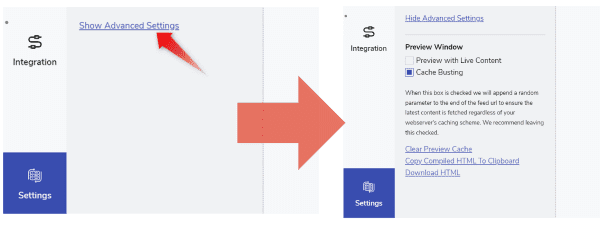
You may also notice while we moved some sections around, the Settings tab, formerly “Tools”, is now at the bottom-left corner. You’ll also see a few settings are more hidden here such as Preview with Live Content and Cache Busting, but don’t worry! These settings are still available by clicking Show Advanced Options.
That’s it for this update! Here at FeedOtter we’re always looking for ways to make a better product for you. If you have any questions or suggestions for how we can continue creating a better user experience, please contact us at success@feedotter.com. Or, if you’re looking for a quick overview of the Automated Email process with FeedOtter, watch this video. Happy emailing!
[ad_2]
Source link