By Ramashish Bhowmik
With the rise of digitisation, brands are increasingly shifting towards unparalleled marketing strategies as an effective tactic to solidify their position as market leaders. Emerging as the beacon of prowess for businesses to accomplish their marketing objectives- performance marketing has completely altered the foundations of successful marketing. From seasoned marketers to entrepreneurs, almost everyone is leveraging performance marketing to strengthen their marketing game.

A result-driven approach that capitalises on producing measurable outcomes and quantifiable results, is a must to excel in today’s fiercely competitive landscape. Unlike conventional tactics, performance marketing delves deep into curating the most optimised marketing strategy, which aims to create brand awareness, whilst generating tangible outcomes from lead generation, sales, app instals or website visits, customer acquisition and much more. Further, this pay-for-performance model is the best channel for businesses to allocate resources effectively, and pay if the desired results are yielded.
Performance marketing is recognised for hosting a myriad of advantages such as accurate targeting and segmentation, continuous optimisation based on data analysis, testing, and refinement, higher return on investment (ROI) and many others. Subsequently, it has become a cornerstone in the realm of marketing and beyond. As we venture into 2024, brands charting a meticulous roadmap to robust performance marketing strategy by harnessing the potential of effective tips, stand paramount with this competitive edge.
Designing irresistible offers and landing page
In a successful performance marketing campaign, a well-laid-out landing page and constructive offers are non-negotiable. Poorly planned landing pages can often deter visitors from converting, simultaneously offers that don’t deliver anything in return can hamper customers from clicking through. For any performance marketer, the core responsibility lies in making sure that brands have an enticing offer and taking effective measures to regularly audit the site for any potential problems a visitor might encounter. By testing the overall user journey from a landing page to a shopping cart, auditing links and offers, and regularly updating content that is underperforming, Performance marketing can help brands witness unprecedented growth.
Leveraging A/B testing to drive KPI metrics
Almost every great performance advertiser is cognizant that testing and measuring formulate the core aspects of holistic performance marketing strategies. For, a performance marketing strategy to work seamlessly and deliver the best possible outcomes, it is pivotal for marketers to implement A/B Testing in the mix, specialising in experimenting with diverse techniques and strategies for enhanced KPIs such as click-through rates, conversion rates, AOVs and website traffic to get a crystallised picture of what’s working and what’s not.
Careful selection of traffic sources
One of the KPIs of performance marketing is to drive more traffic to the website, app or a mix of social media channels, but at the same time, it is equally important to ensure that the traffic is coming from reputable sources, laying down the basics of a full-proof performance marketing plan. When less-than-reputable sources are observed advertising the business, consumers may think twice about trusting the business’s reliability, service, quality and at last the brand itself, deterring consumers from visiting ever again. Instead of generating a plethora of low-quality traffic, brands need to collaborate with affiliates that are reputable and will drive meaningful traffic to the site.
Monitoring performance as per the set goals
It’s crucial for marketers to routinely monitor performance against the set goals, in order to procure a clear picture of the critical improvement areas. Since performance marketing is an iterative process that needs constant monitoring, it also delivers the opportunity to refine strategies if the campaign fails to meet the established expectations and results. With the aid of aligned and clear goals, brands will be able to design a roadmap to success, ensuring that the marketing efforts are targeted towards accomplishing desired outcomes that are directly correlated with the growth of the business.
Performance marketing: The new-age data-driven approach to marketing
The world of performance marketing has evolved into the most sophisticated, game-changing and multifaceted discipline in the arena of marketing. At its heart lies formulating a methodology that is highly brand-centric, allowing it to only pay when the targeted action is undertaken by the consumer. With brands gaining more access to users’ data, it’s high time they leverage the power of their performance marketing arsenal to deliver the most exquisite customer experience.
The author is co-founder of Adbuffs
[ad_2]
Source link
Blogger is among the earliest content management systems (CMS) introduced to the internet. It was launched in 1999, and the WordPress predecessor has since provided an intuitive space for creating websites in minutes. With Google acquiring the platform in 2003, you now have the added benefits of monitoring visitor activities and drag-and-drop functionality from your personal laptops. The acquisition doesn’t boost your ranking on the search engines over non-Blogger sites. However, it paves the way for more new and improved features.
You don’t need any HTML or graphic design skills to launch your site, but having a Google account is necessary. If you haven’t already, create one in a few steps. Creating a new blog is easy, but the fun part lies in what you can do afterward. The platform enables you to choose your favorite themes, organize posts, and protect your site with restrictions. If you want access to these interesting features, here are some tips and tricks to help you on your blogging journey.
Blogger has a mobile app, but it has limited features. It’s best used to create and edit posts. If you want extended customization capabilities, use the browser version on computers. You can still access it on your phone when you switch to desktop view.
Edit your theme
Blogger provides more than 20 themes, ranging from the Contempo to Travel categories. Each has a preset layout and color scheme, but you can customize them to your preference. It’s better to edit your blog design on a computer or tablet browser as it gives you a wider screen to work on. When using a phone browser, tap the eye icon anytime you want to Preview changes unless you switch to Desktop view.
Change Blogger theme on computer browsers
- From your dashboard, click Theme in the left sidebar.
- Select a theme from the available categories.
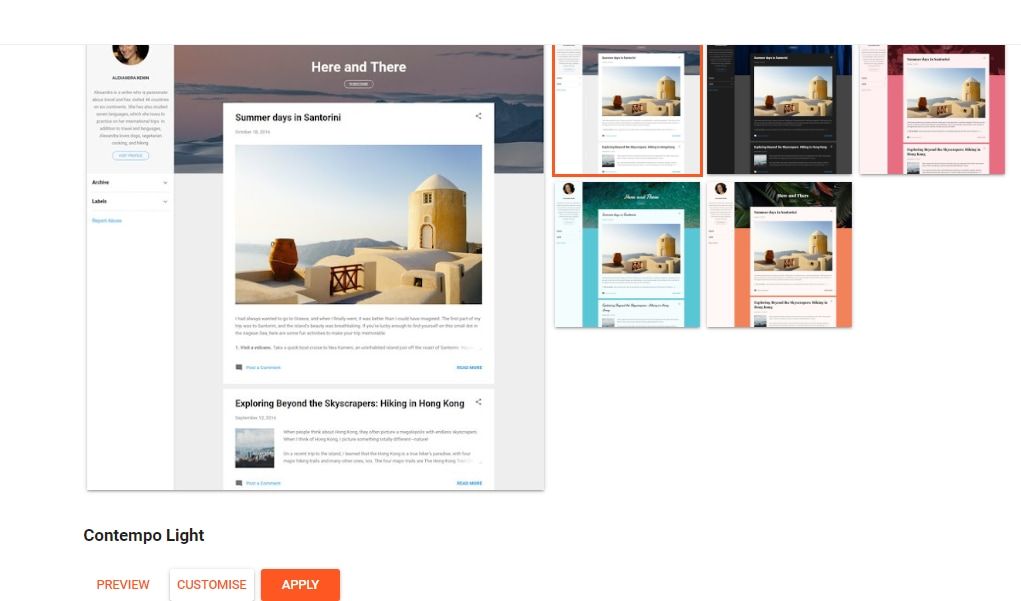
- To see what the theme looks like on different devices, click Preview.
- To change the theme’s appearance, click Customize.
- To use it immediately, click Apply.
- If you customize your theme, use the left sidebar to alter your blog’s background image, color, fonts, and more.
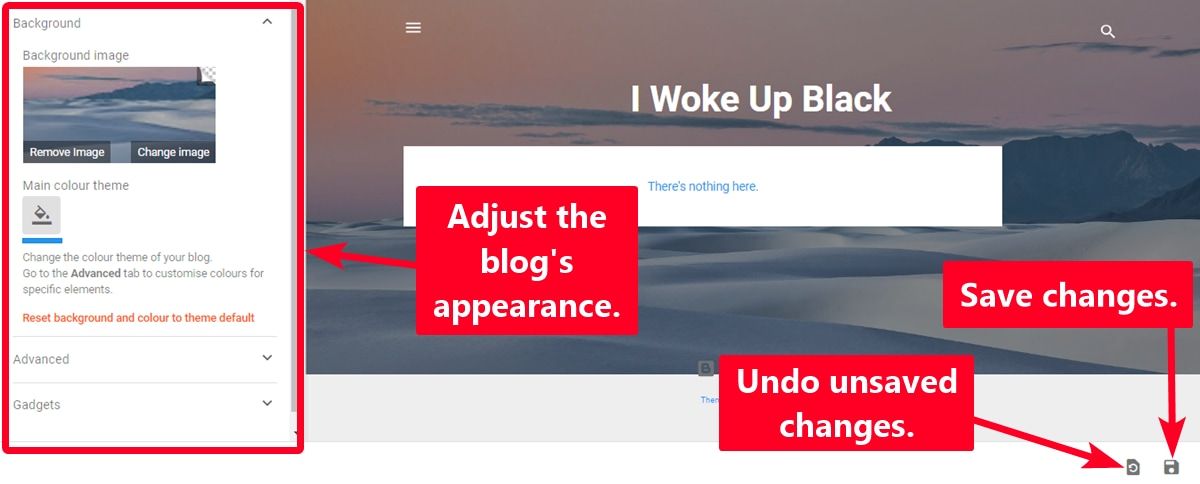
- Click the floppy disk icon to effect the changes.
- Click the undo icon to remove any unsaved changes.


Change Blogger theme on phone browsers
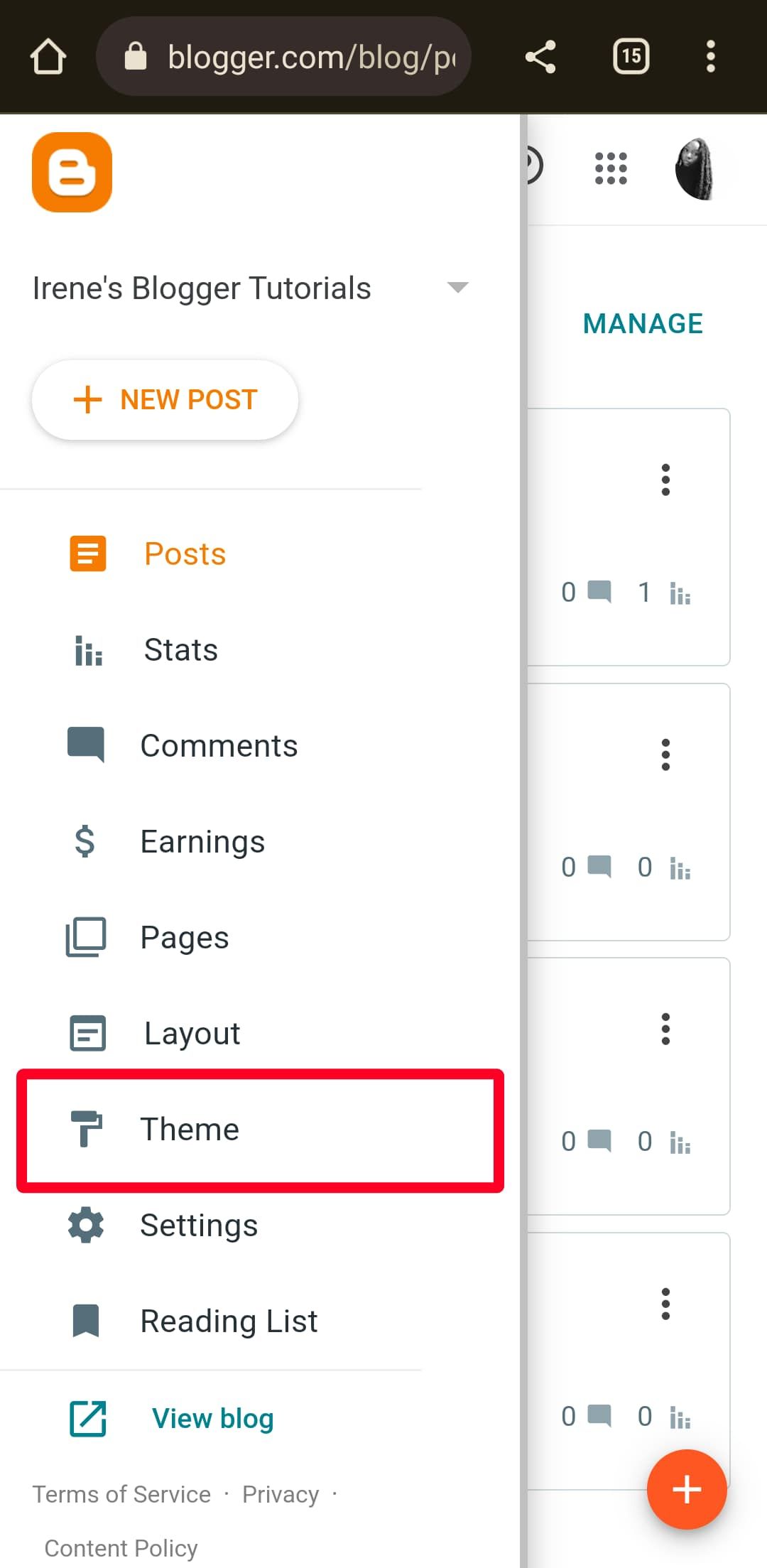
- From your dashboard, tap the menu icon in the upper-right corner.
- Select Theme.
- Pick a theme from any category.
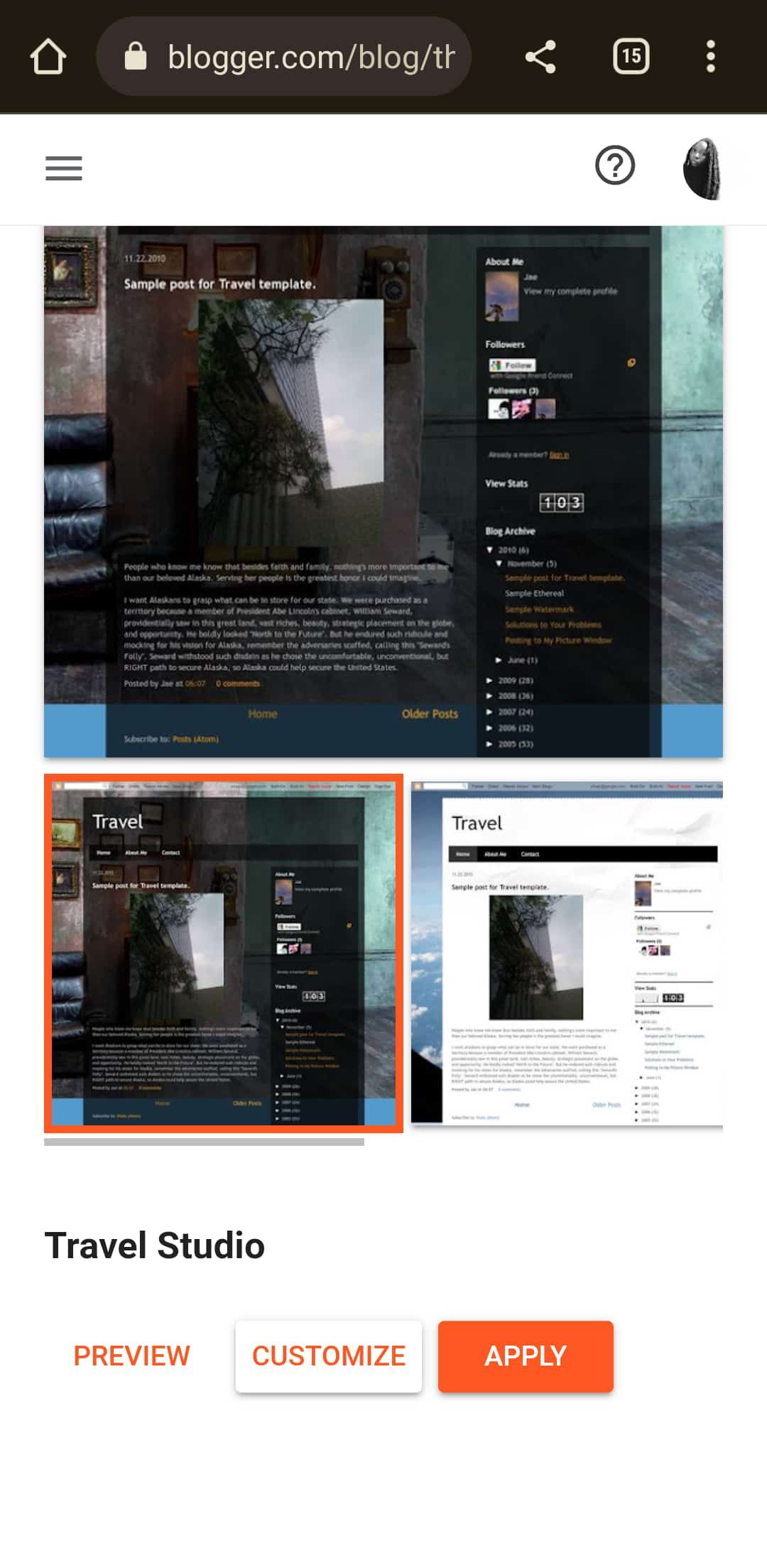
- To see what it looks like on any device, tap Preview.
- To change the theme’s appearance, tap Customize.
- If you choose to customize your blog, use the provided settings to alter your blog’s background image, color, fonts, and more.
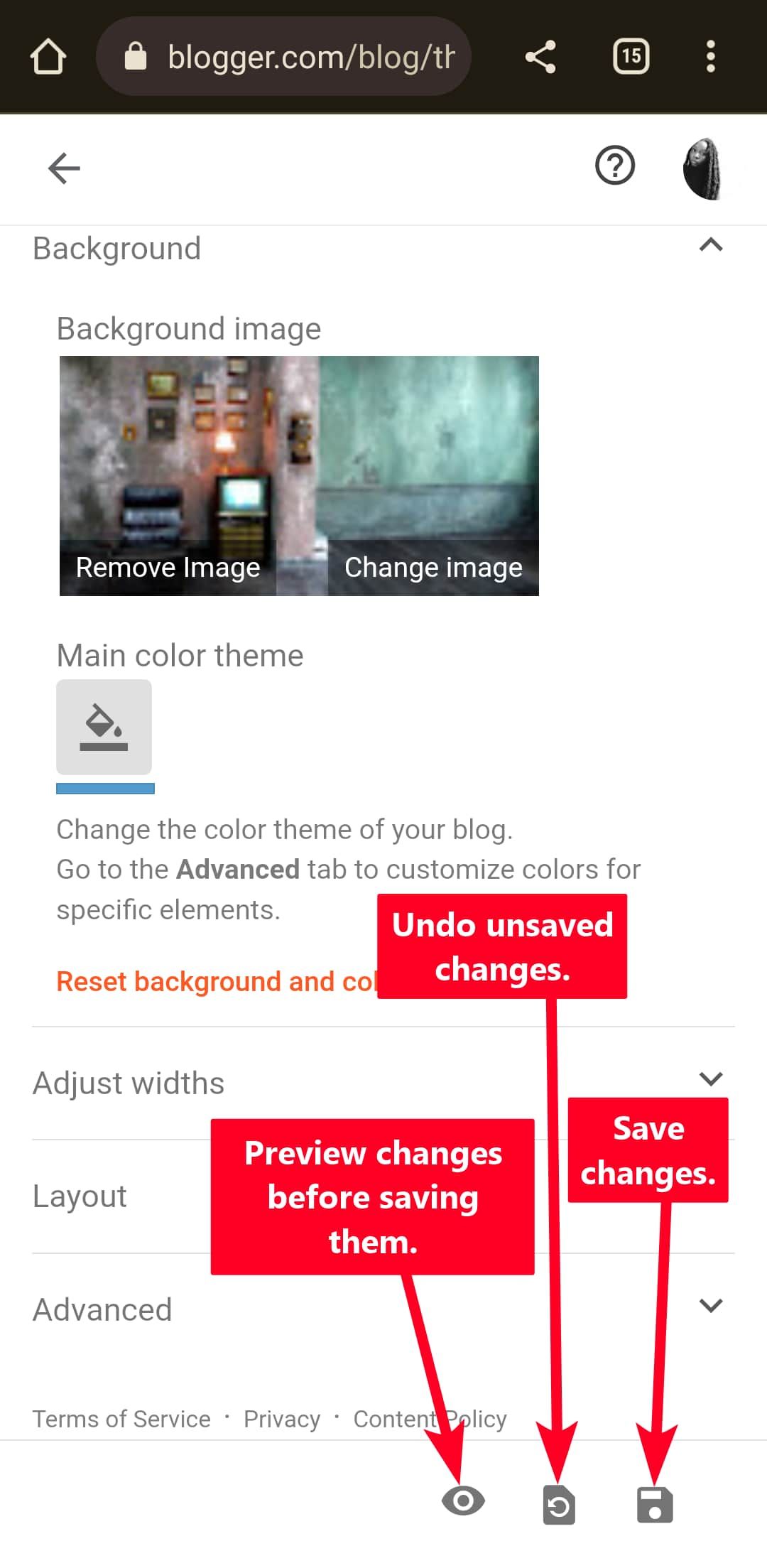
- To preview changes before applying them, tap the eye icon at the bottom of the page.
- To save the changes, tap the floppy disk icon.
- To remove every unsaved change, tap the undo icon.


Make posts from your email
Blogger enables you to create new posts from your Gmail app. This feature is convenient if you want to make a quick upload or give someone else the privilege to do it. You can make a unique link from Blogger’s settings menu for this purpose. The procedure works similarly whether you use a phone, tablet, or computer browser.
Although you can insert images in the email, they appear as attachments. Hence, you don’t have control over their arrangement. It’s better to send your posts as drafts instead. This way, you can edit them properly from your Blogger dashboard before uploading.
Anyone with access to your unique Blogger email address can create posts on your blog. The posts appear with your Author profile, so there’s no way to know who did it. Keep the address private at all times. If you must reveal it, do it with people you trust.
Use the following steps to create your unique email address and make quicker posts.
Create a unique email for posting on Blogger
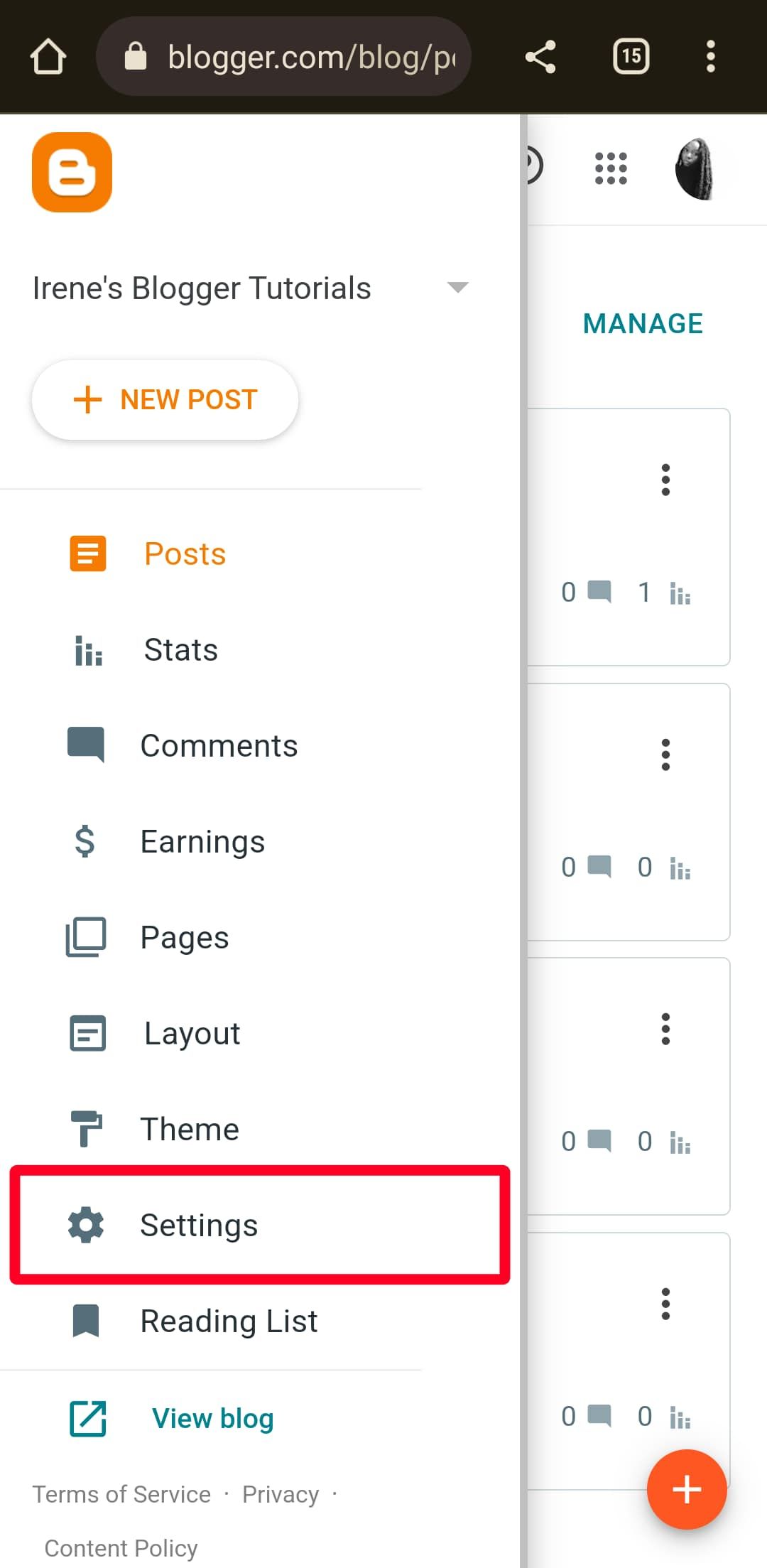
- From your dashboard, click the menu icon in the upper-right corner.
- Select Settings.
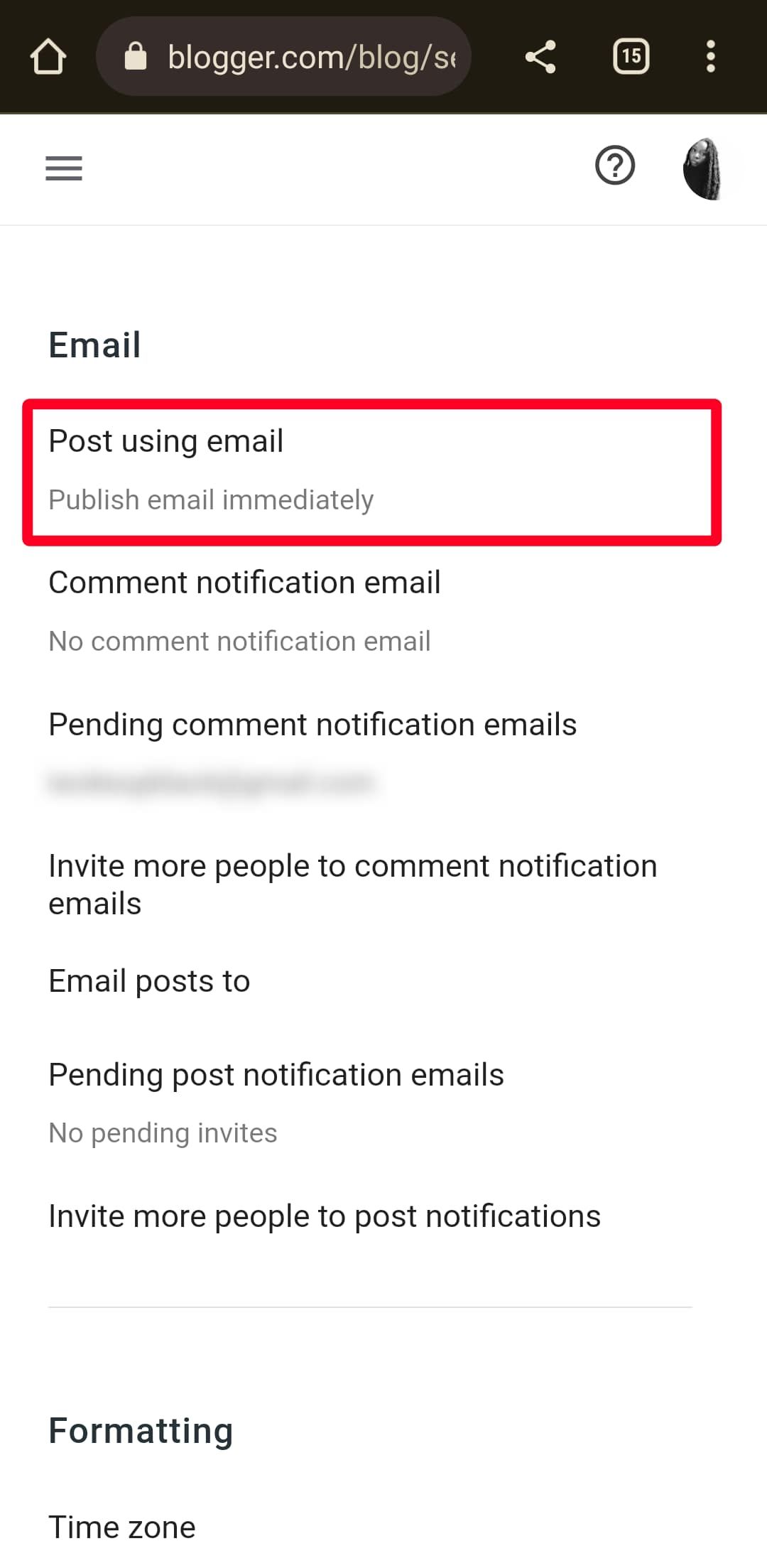
- Scroll down to Email. Then tap Post using email.
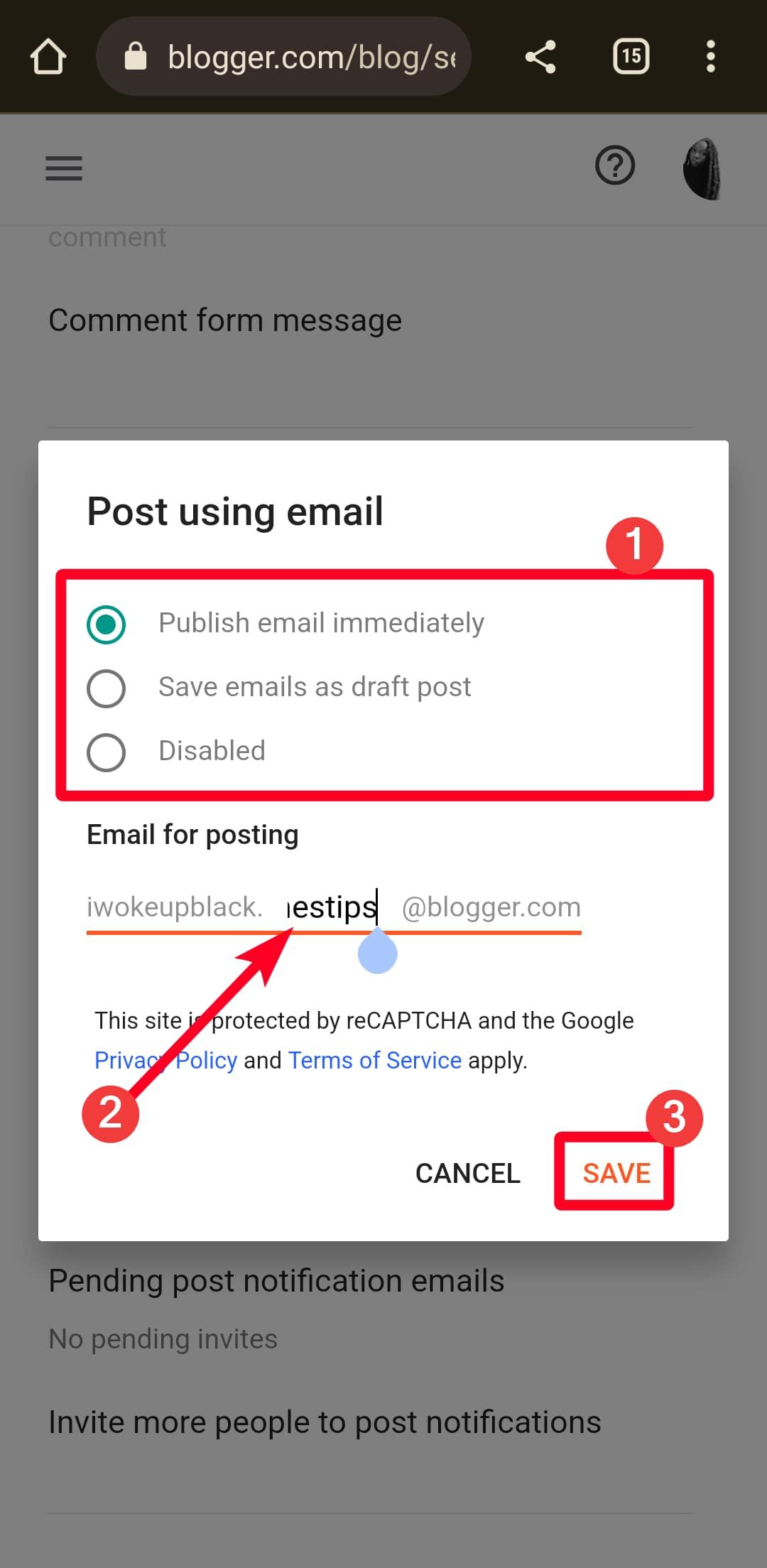
- Choose whether to publish emails immediately or save them as drafts.
- Under Email for Posting, type a unique name. Blogger doesn’t let you use your domain name, so choose another one.
- Select Save.


Make a Blogger post from Gmail
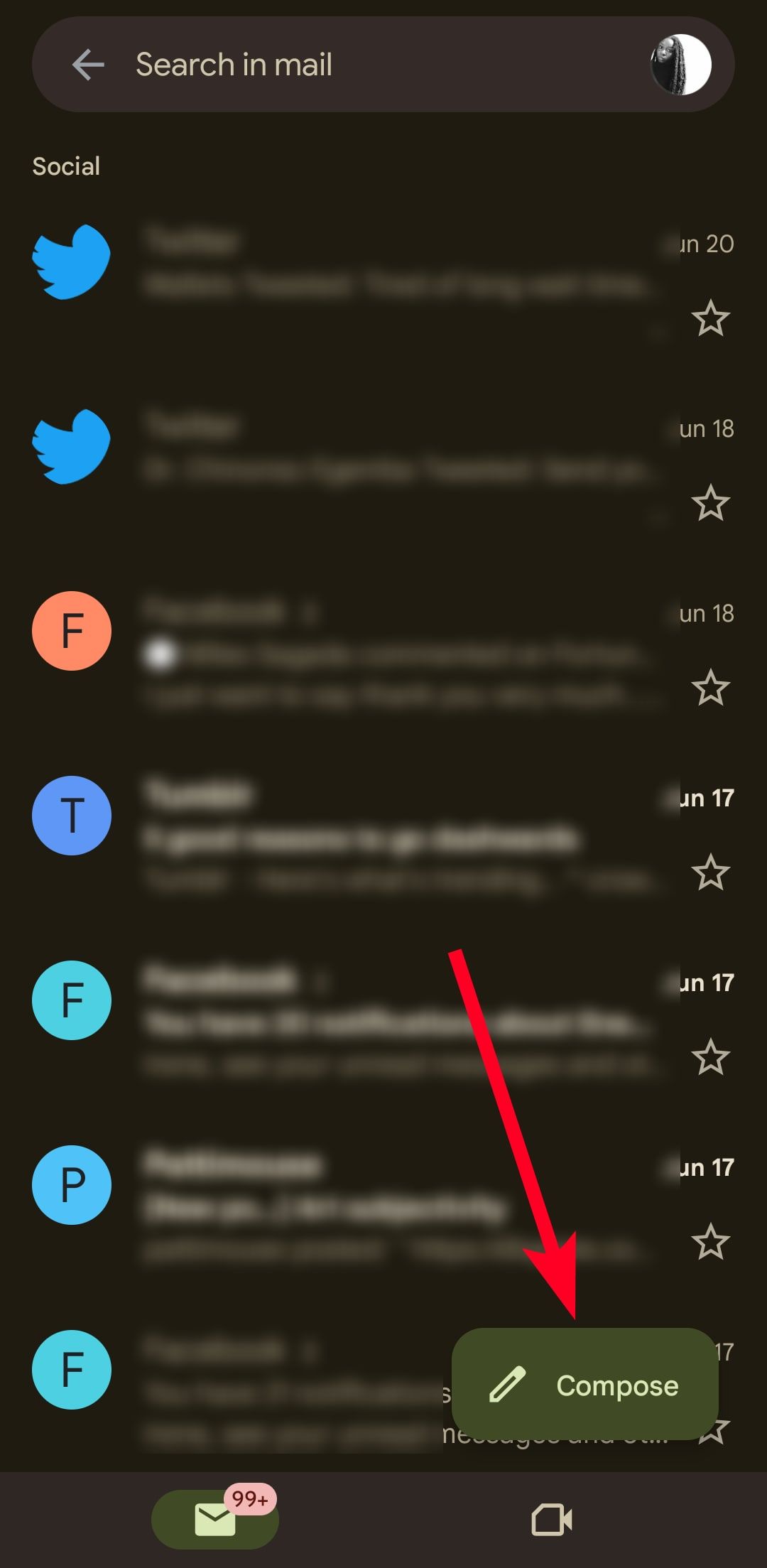
- Open the Gmail app.
- Tap Compose.
- In the Subject field, type your post’s title.
- Paste or type your post in the field that says Compose email.
- Tap the attachment icon to insert images or videos into your post.
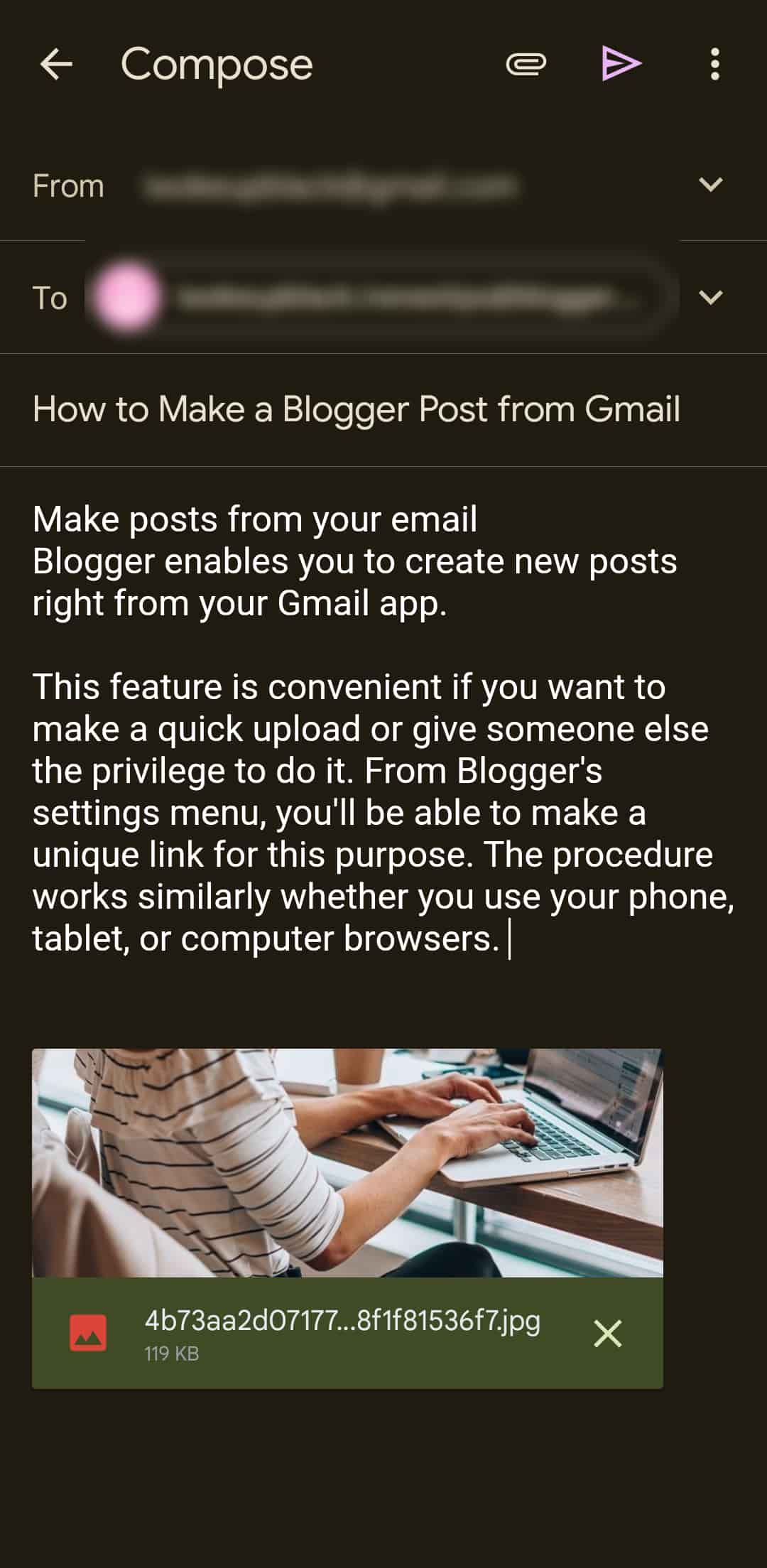
- Send the email to the unique address you created earlier.
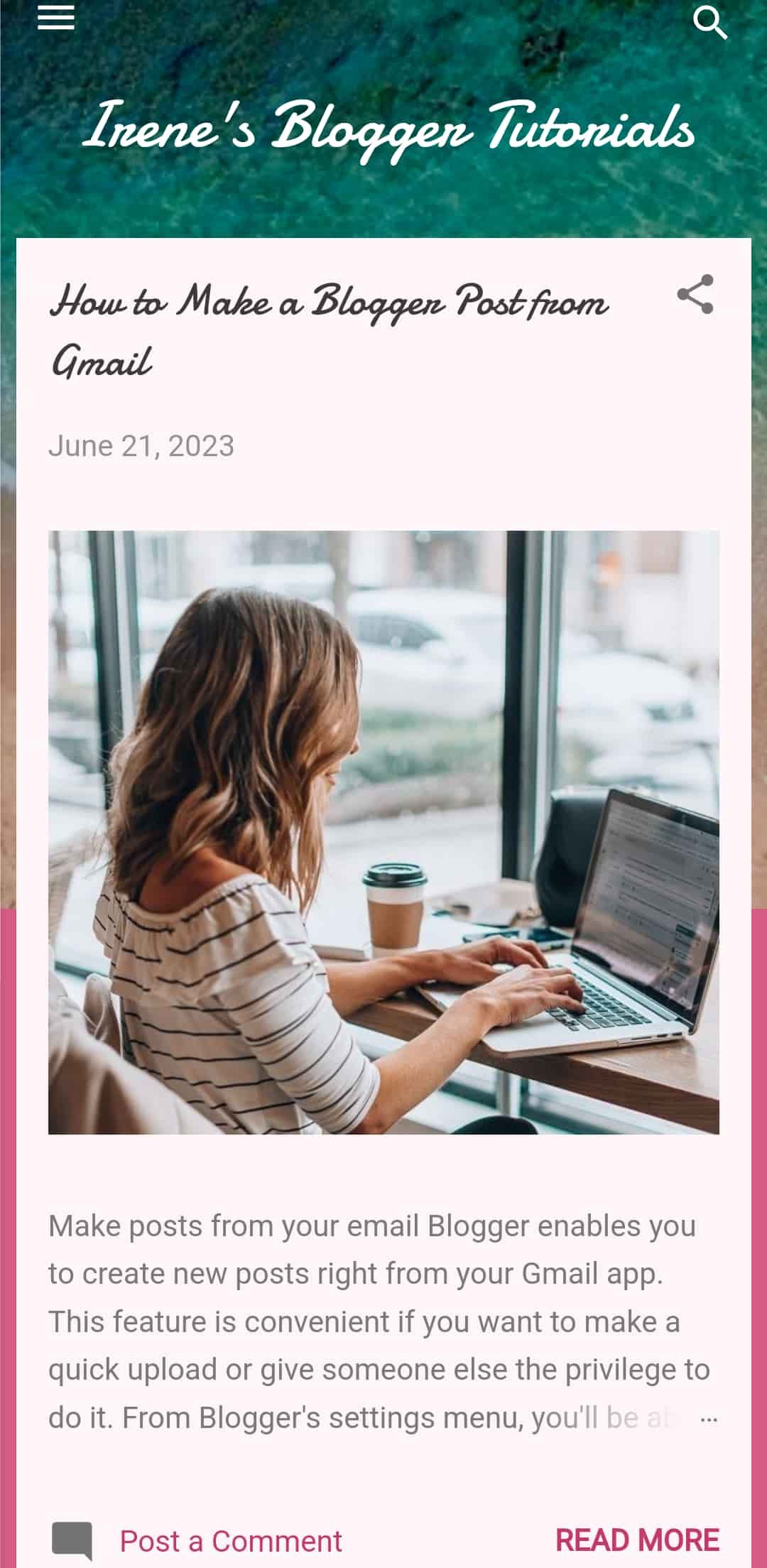
- If you publish immediately, your post appears on the blog shortly. If you post as a draft, check the Posts menu.


Invite collaborators and manage blog access
Being a full-time blogger can be exhausting. If you can’t cope with the stress, invite someone to join your team. Blogger lets you add up to 100 members to your blog, and they can be Authors, Administrators, or Readers.
Their responsibilities are as follows:
- Authors can edit existing posts and create new ones.
- Admins can add or remove authors, readers, and other admins including you. Also, they can change blog settings, edit posts, and delete posts.
- Readers can only view, share, and comment on your posts. If you invite custom readers, your blog becomes private to the rest of the world.
Once you send an invitation, the recipient has all the time in the world to accept it (as long as you don’t cancel it). Use the steps below to invite people to your blog.
Invite Authors and Admins to your Blogger website
- From your dashboard, go to Settings.
- Scroll down to Permissions. Then select Invite more authors.
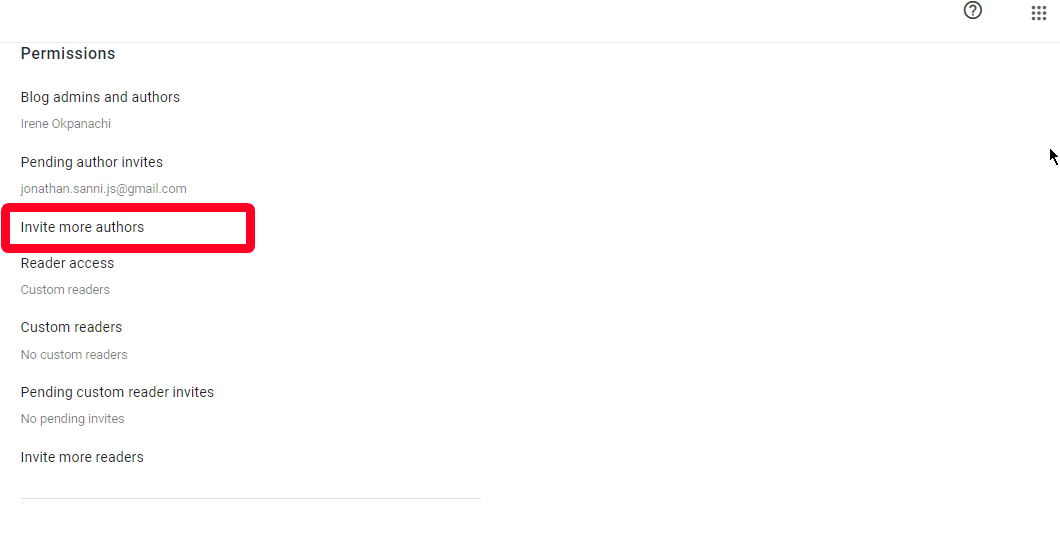
- Type the email address of the person you want to invite. Then click Send. Their name appears under Blog admins and authors once they accept your invite.
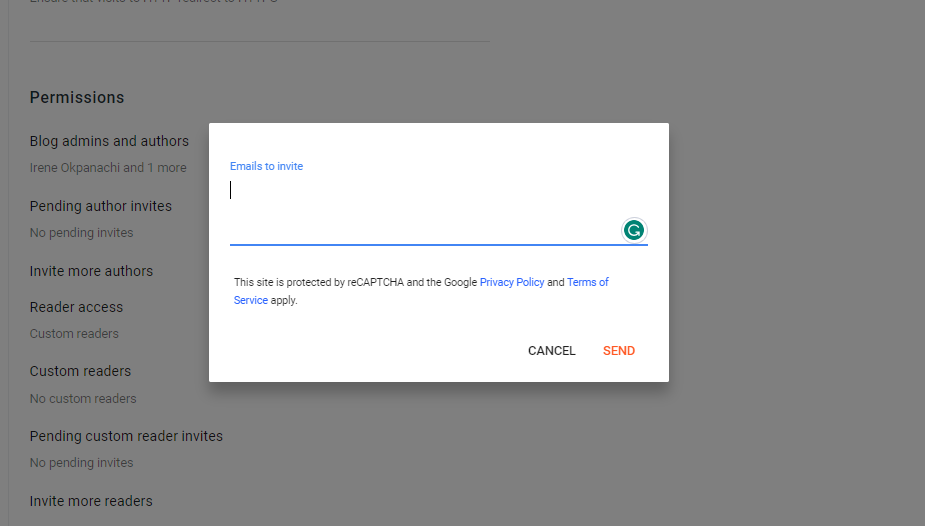
- To revoke the invite before they accept it, select Pending author invites. Then click X beside their name.
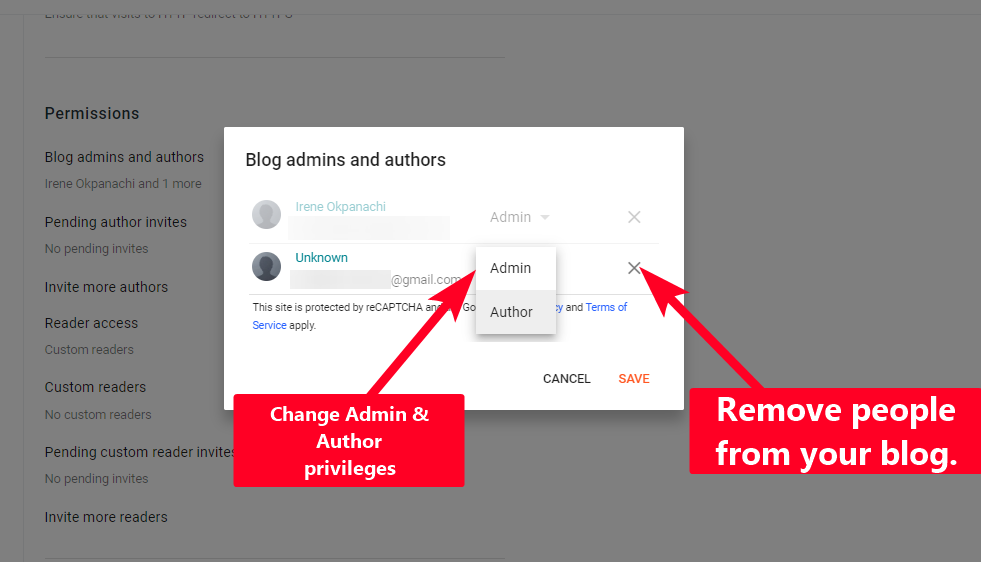
- If your invitee accepted the invite, go to Blog admins and authors. Then click X beside their name.
- To give someone admin privileges, click Author. Then select Admin.


Invite Readers to your Blogger website
- Go to the Settings menu from your dashboard.
- Scroll down to Permissions.
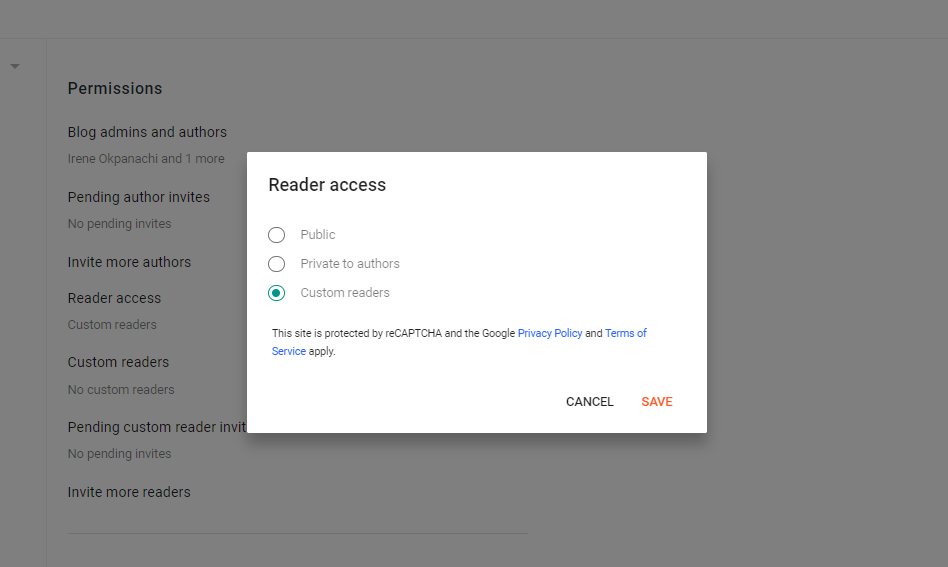
- Switch Reader access from Public to Custom readers. Save the settings.
- Click Invite more readers.
- Enter the email address of the person you want to invite. Then click Send.

Reorder blog posts
By default, Blogger uses the newest to oldest format to order your posts. There’s no button or setting for sorting them any other way. But one way to work around this setback is to change the publishing dates. Doing so makes posts appear before or after each other, according to the date and time you chose. Use the following steps to do it.
Reorder Blogger posts on computer browsers
- In the Posts menu, click a post to enter editing mode.
- On the right sidebar, click Published on.
- Choose Set date and time. Then select a new publishing date and time from the provided fields and calendar.
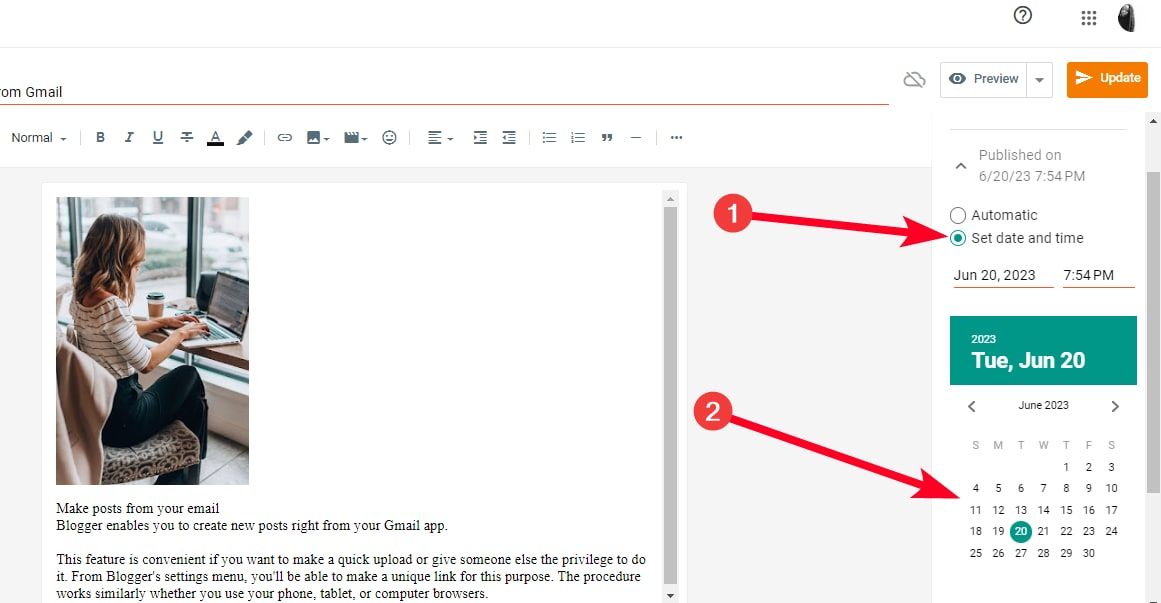
- Click Update.

Reorder Blogger posts on phone browsers
- In the Posts menu, tap a post to edit it.
- Tap the gear icon to expand a sidebar on the right.
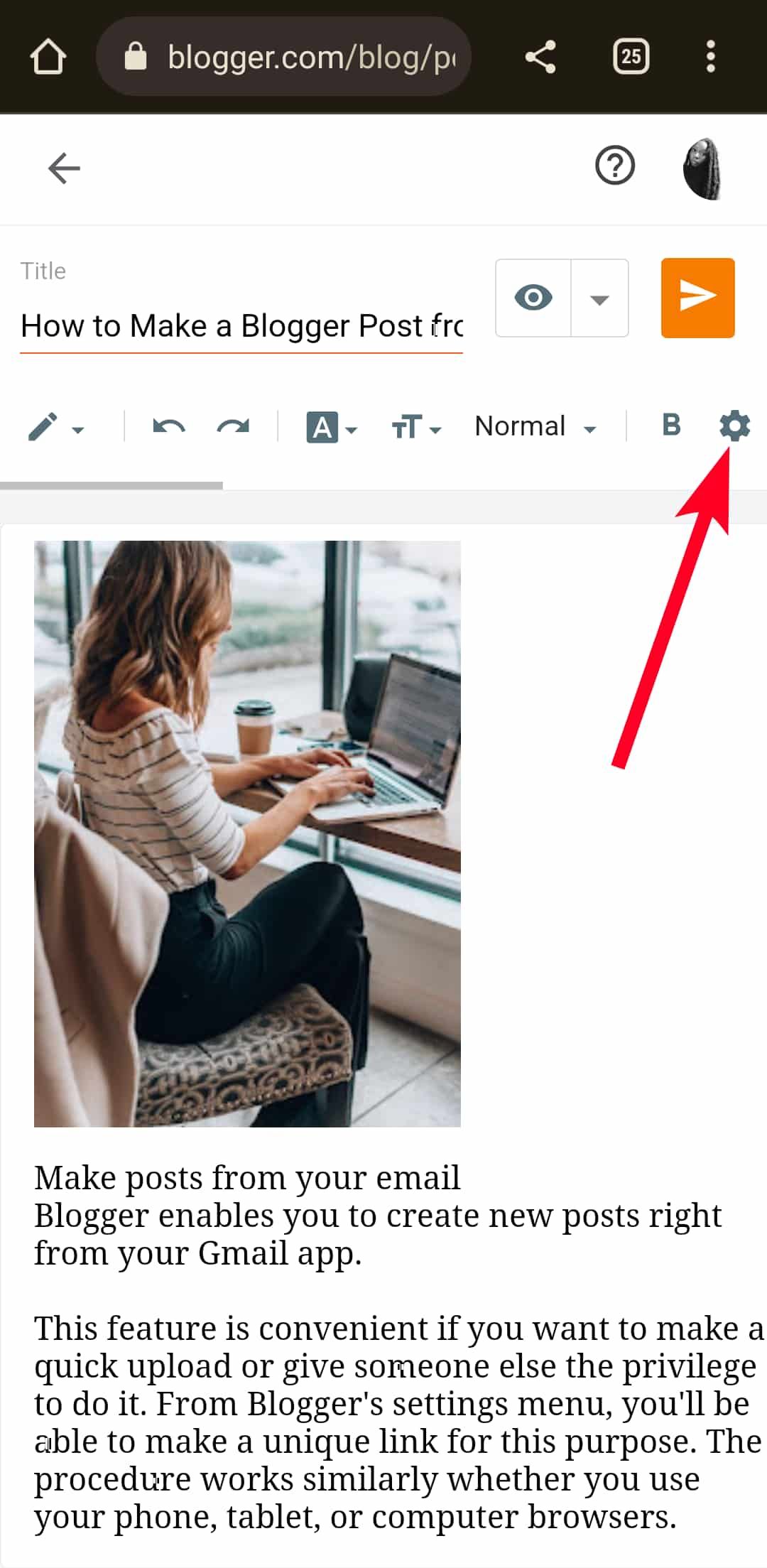
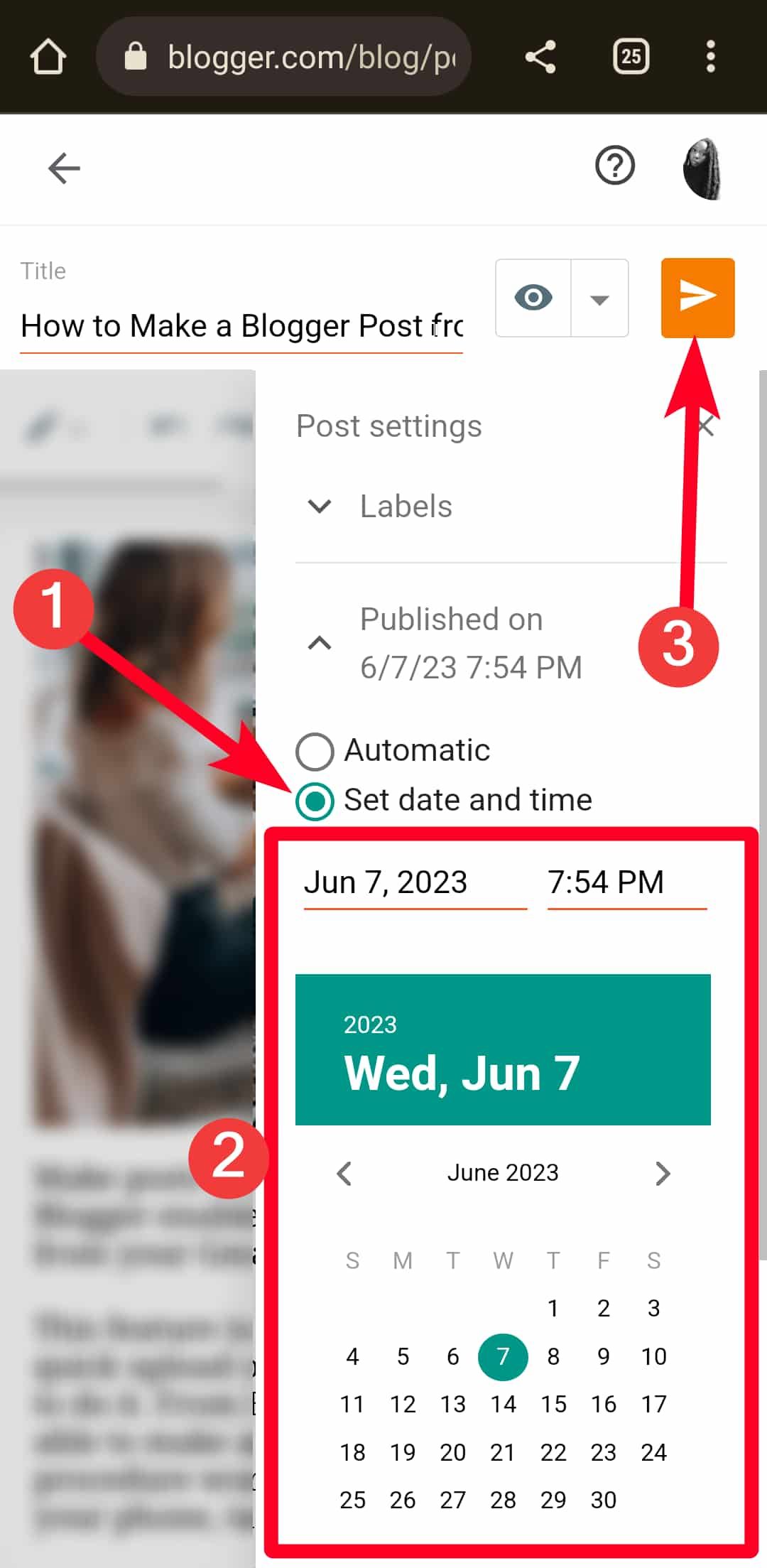
- Tap Published on.
- Choose Set date and time. Then select a new publishing date and time from the provided fields and calendar.
- Tap the paper plane icon to publish your post.


Sort posts with labels
Blogger labels help you tag or sort posts into relevant categories. For example, if you wrote a post on the best Android phones, your labels would be “smartphones,” “mobile devices,” and “Android.” If your post is about the best iPhones, your labels would be “Apple devices,” “iOS,” and “iPhone.” While this feature doesn’t score you any Search Engine Optimization (SEO) points, it tells site visitors what type of content you’ve written and delivers a better user experience when navigating the blog.
Follow the steps below to add labels to your posts:
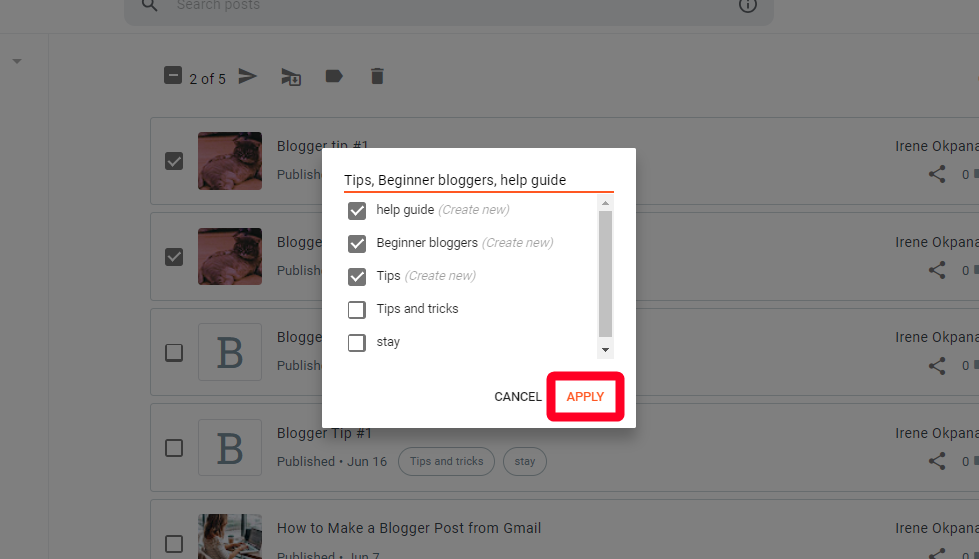
- In the Posts menu, click Manage.
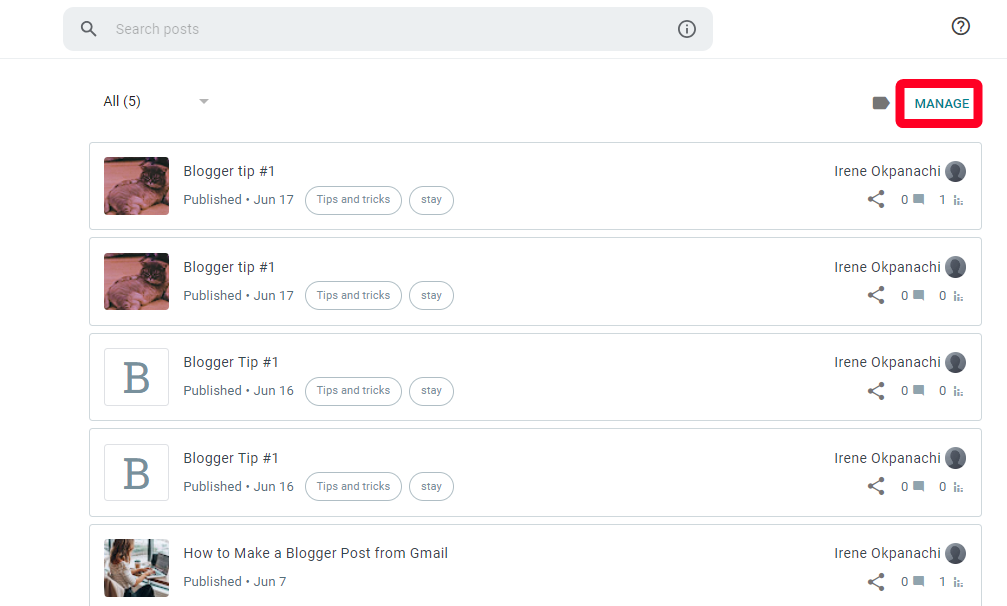
- Click the checkboxes to label multiple posts at once. Then click the label icon.
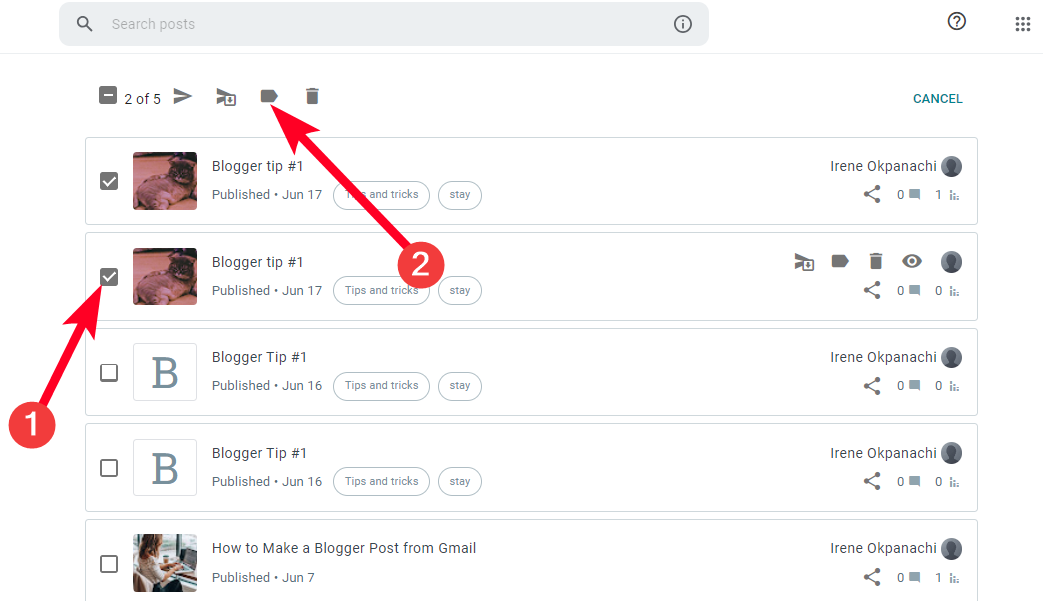
- Type a keyword to form a new label. To make more labels, use a comma to separate the keywords.
- Click Apply to save the changes.


Use Google Analytics
Blogger has a Stats menu that helps you monitor traffic on a basic level. If you want deeper insights into visitor engagement, use Google Analytics. Along with page views, the tool shows what site visitors do on your website.
You can track their sessions, how much sales you’re making, and conversion rates. Also, you can do keyword research with the inbuilt planner and create high-quality content based on searcher intent. Although it’s part of Google’s Marketing platform, you must set up a new account and generate a Google tag ID to use it. Once you’ve accomplished that, follow the steps below to integrate it with your Blogger website:
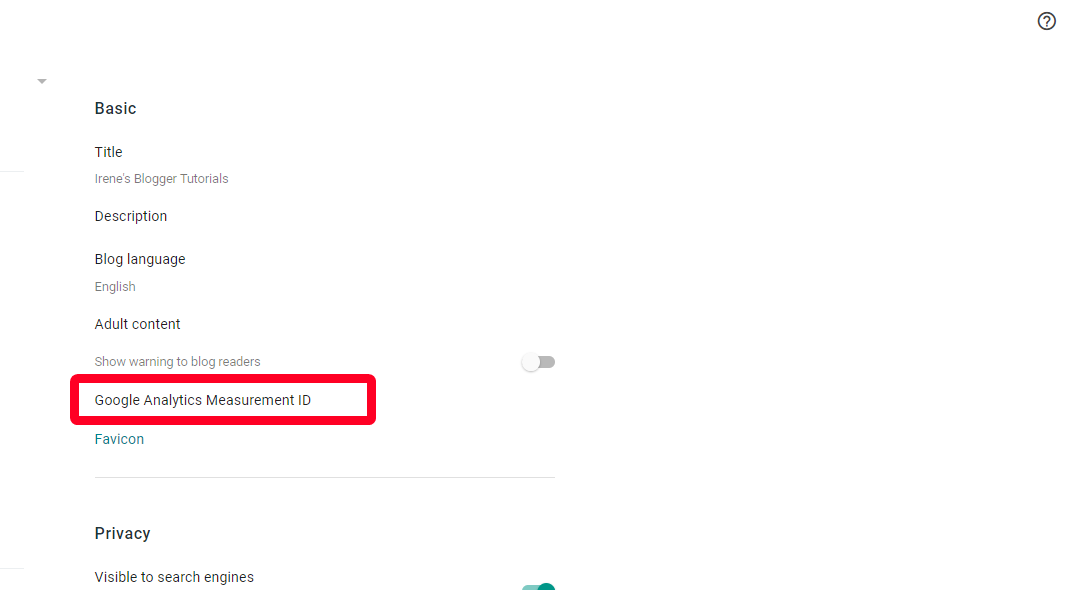
- Go to the Settings menu from your Blogger dashboard.
- Under Basic, select Google Analytics Measurement ID.
- Enter your Google tag ID. Then click Save.
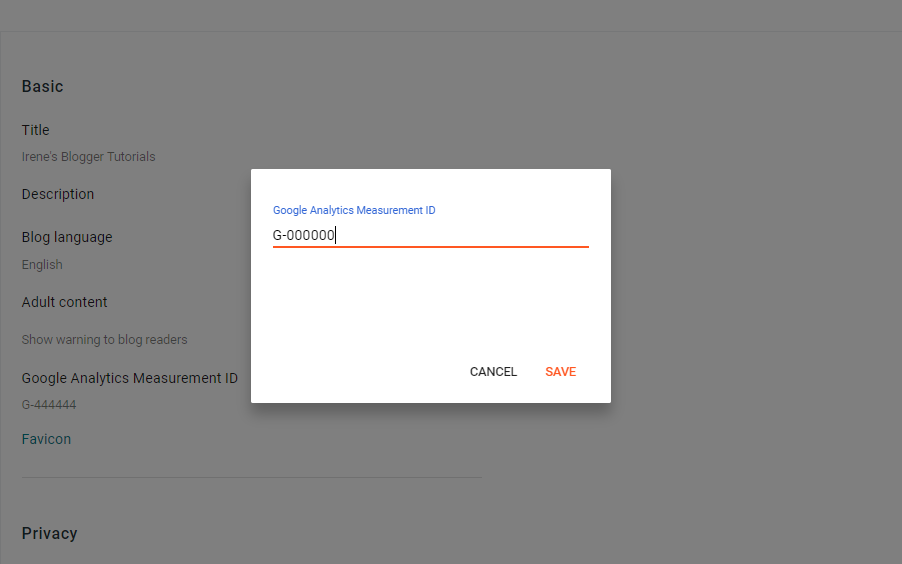


You can now monitor traffic on your Google Analytics dashboard. If nothing happens after setting it up, that’s normal. It may take up to 24 hours to get insights about visitor data.
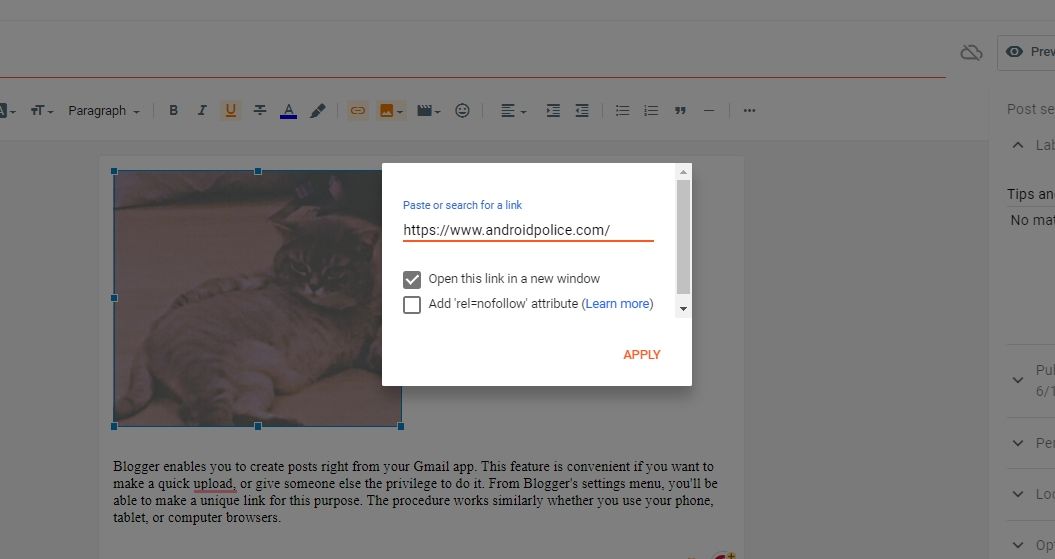
You may be used to seeing hyperlinks on text when you visit most websites. On Blogger, you can add them to images. This action produces a clickable photo that redirects visitors to any web page you define. You can try it for any picture format, and it makes an interesting Call To Action (CTA) if you don’t want to bombard visitors with texts. Use the following steps to generate clickable images on Blogger:
- In the Posts menu, click a post to edit it.
- Click the image icon to insert pictures.
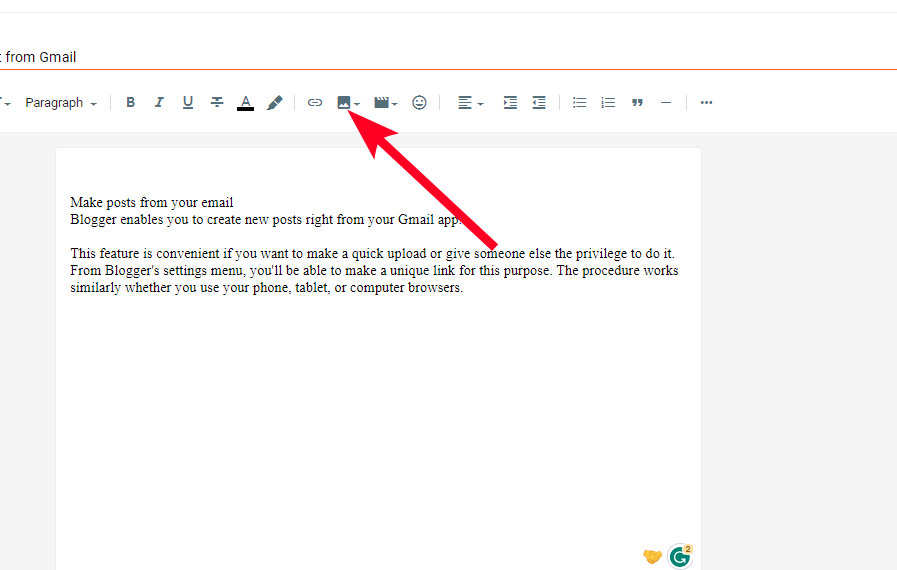
- Once you’ve inserted an image, click it. Then click the hyperlink icon.
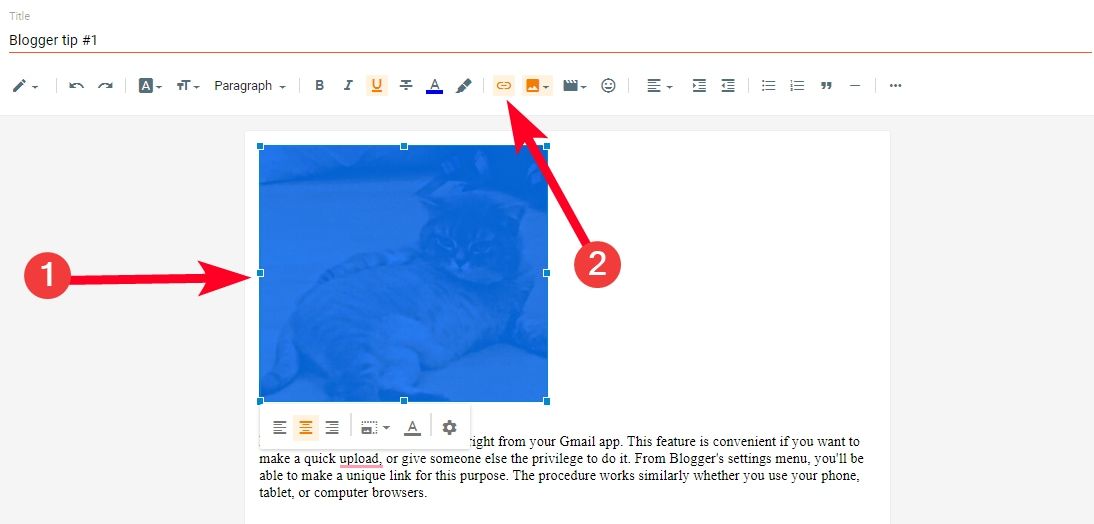
- Paste the link to the web page you want to redirect visitors to. Then click Apply.


Once you publish or update your post, visitors can see and interact with your clickable image. That said, you can’t just Google search an image and use it in your article. Copyright laws protect almost every material you see online. So, it’s important to check that you have permission to use them to avoid prosecution.
If you want free and licensable media, there are many places to find stock photos online. Look for photos with a Creative Commons license. This license gives you permission to modify and use them even for commercial purposes. The downside is that stock images are generic, and millions of bloggers may use the same ones you chose. If possible, take and edit original photos on your device.
Add Gadgets
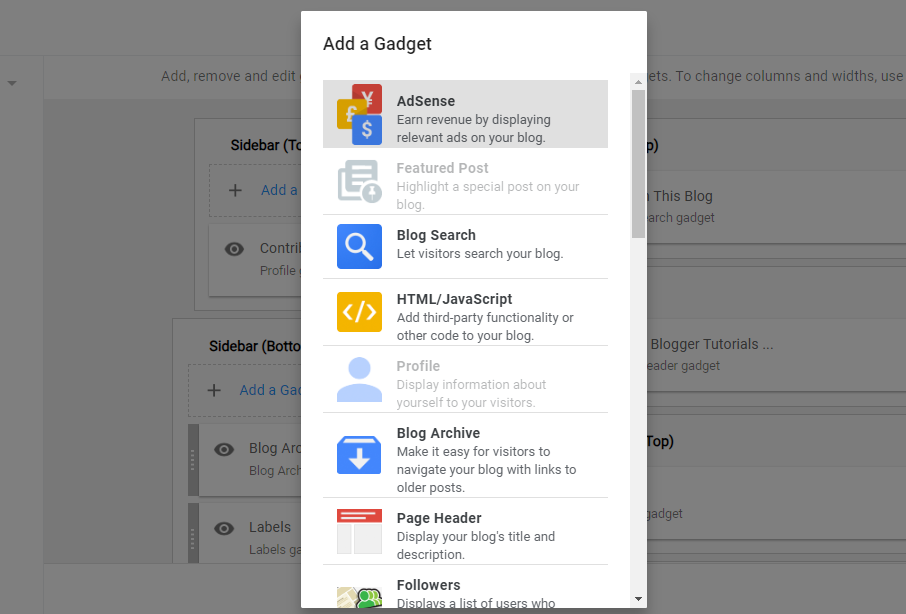
Blogger doesn’t have plugins, but it has something similar. They’re called Gadgets, and they provide additional functionality to your site. The platform preinstalls some for you, such as the blog search and page header gadgets. You can’t remove them completely, but you can hide them from view. Also, you can add an RSS feed and a contact form or embed ads to your layout with Google AdSense.
Gadgets are limited, so you may be unable to reach your blog’s full potential. Also, Google provides all of them, and there’s no way to use third-party add-ons.
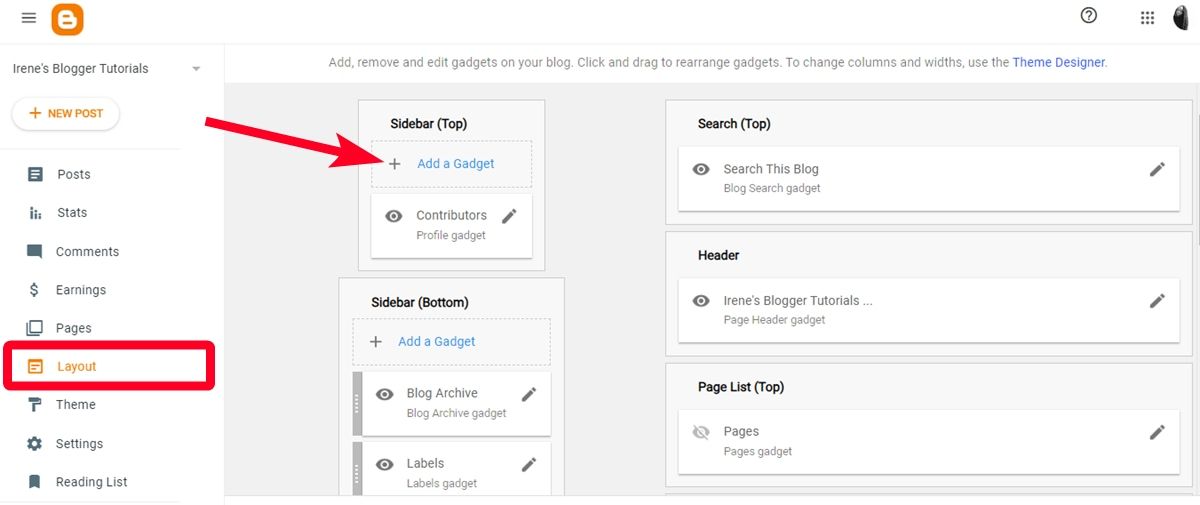
To access Blogger gadgets, use the following steps:
- From your dashboard, go to Layout > Add Gadget.
- Select a Gadget from the list.


Monetize your blog
Many people view blogging as a get-rich-quick scheme. While it does grease your pockets, managing a successful blog requires hard work. Hence, you won’t see those dollar signs overnight. But if you want to start earning, look into advertisements and affiliate marketing programs. Since Google doesn’t support third-party plugins, your only chance of earning is to use the Google AdSense Gadget. This way, you can feature third-party ads on your site and earn with every visitor click. You need to create an AdSense account before adding the Gadget to your site.
To monetize your blog with Google AdSense, follow these steps:
- From your dashboard, go to Earnings.
- Click Create AdSense account. This option takes you to adsense.google.com in a new tab.
- Google automatically fills in your blog address. Enter your payment country and choose whether you want personalized recommendations or not.
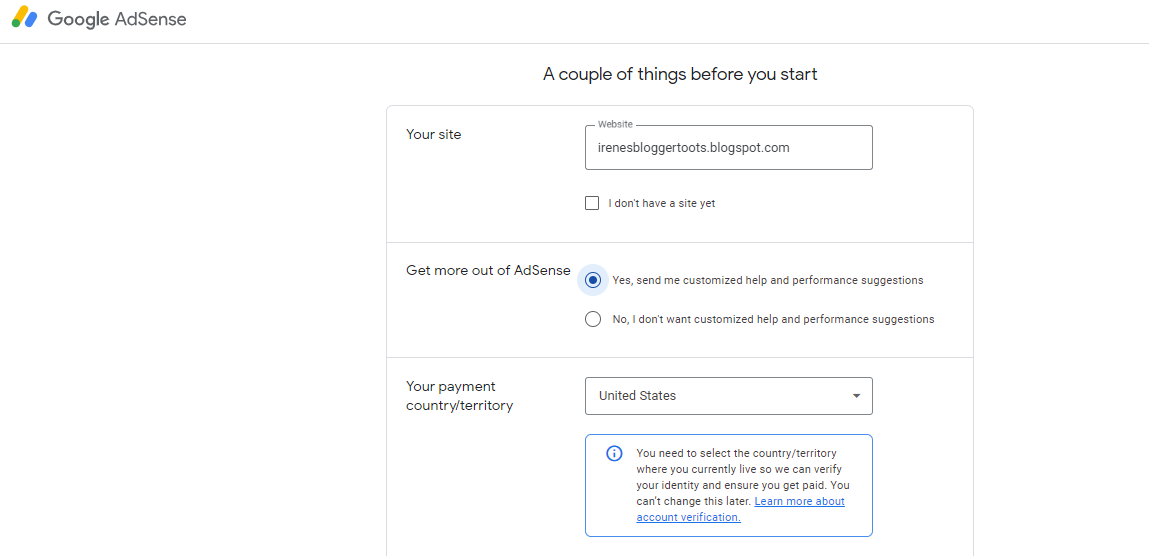
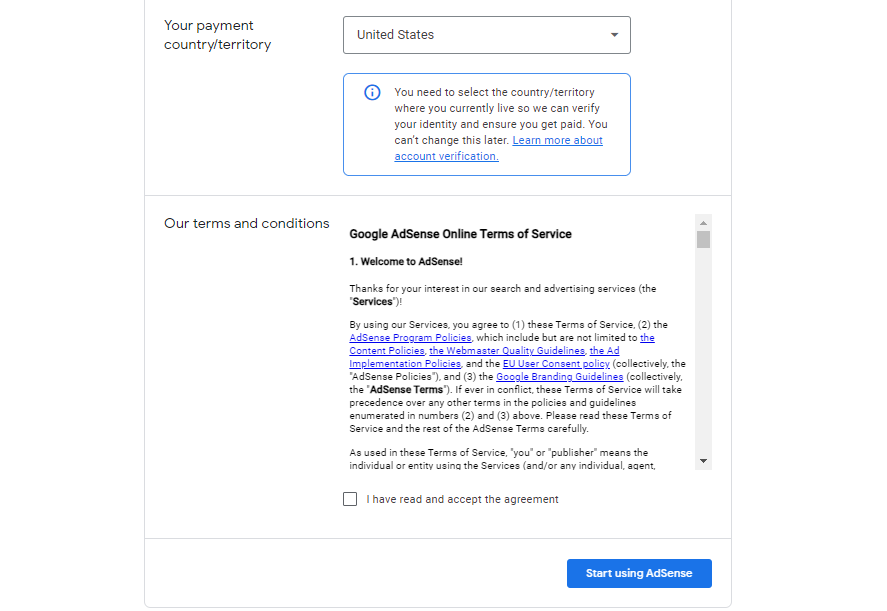
- Accept the Terms and Conditions.
- Click Start using AdSense.
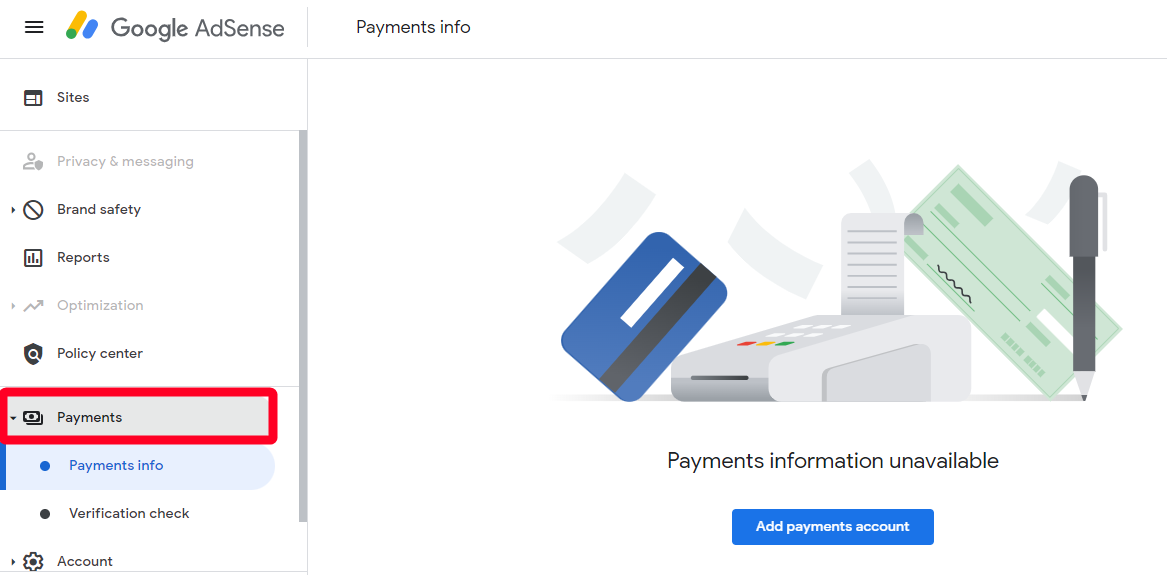
- Go to Payments info to set up your account and verify your identity.
- Once you’re done, the website redirects you to Blogger. If it doesn’t, access it yourself.
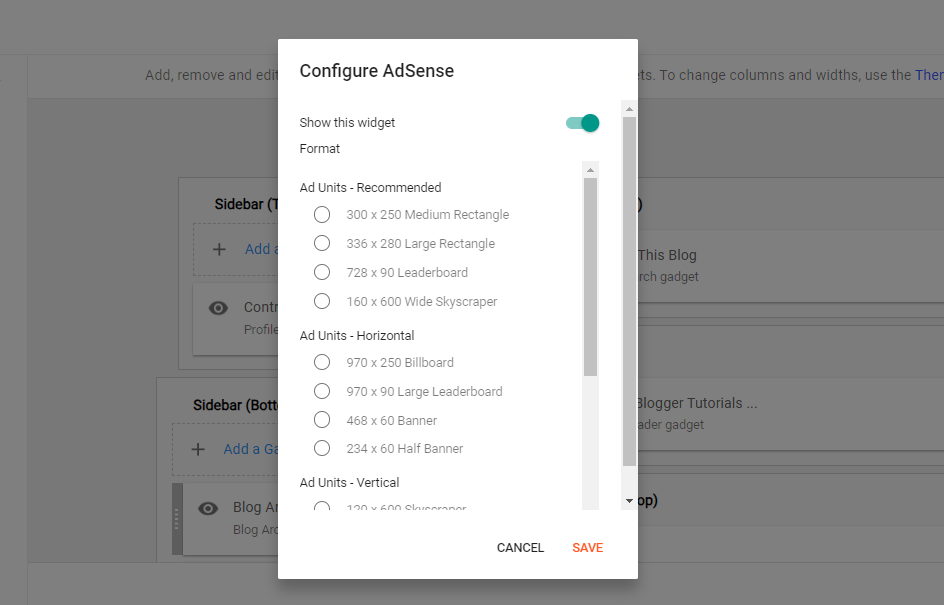
- Go to Layout. Then click Add Gadget on the part of the blog you want to display ads.
- Select AdSense from the list.
- Choose a size. Then click Save.


Promote your blog
Many experts celebrate organic traffic, but it’s not always enough. This traffic comes naturally from search engines. You can only see the results if you have an effective SEO strategy. However, it also means you’re at the mercy of Google’s ever-changing algorithm. The Penguin update is one such change that affected many websites’ rankings, some of which did not recover from the shock.
You should diversify the channels visitors use to access your blog. Rather than depending solely on search engine discovery, share your posts on Facebook, LinkedIn, and other social media platforms. You can even answer questions on Quora and add the links below to attract new visitors.
Also, look into guest posting. It’s when you allow another blogger within the same industry to write and feature content on your blog or vice versa. Guest blogging encourages networking and is another way to build backlinks without breaking any rules. To share your Blogger posts on social networks, follow these steps:
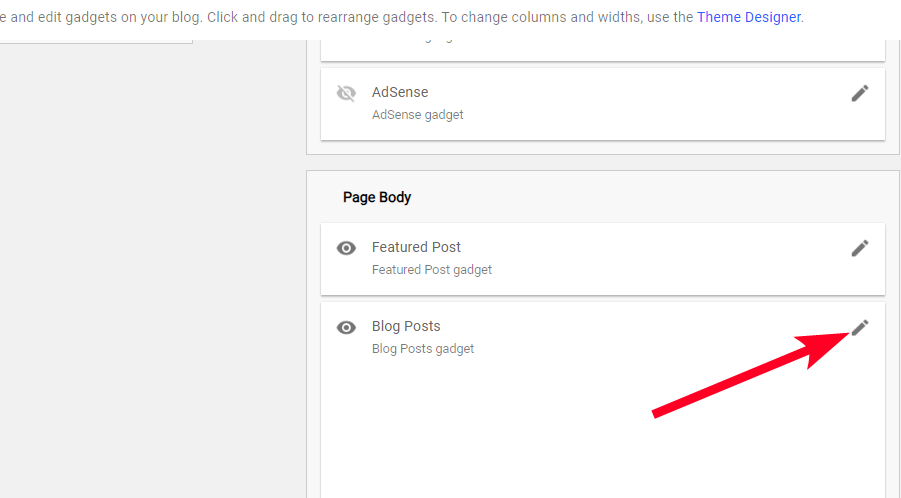
- Go to the Layout menu.
- Under Page Body, click the pencil icon beside Blog Posts.
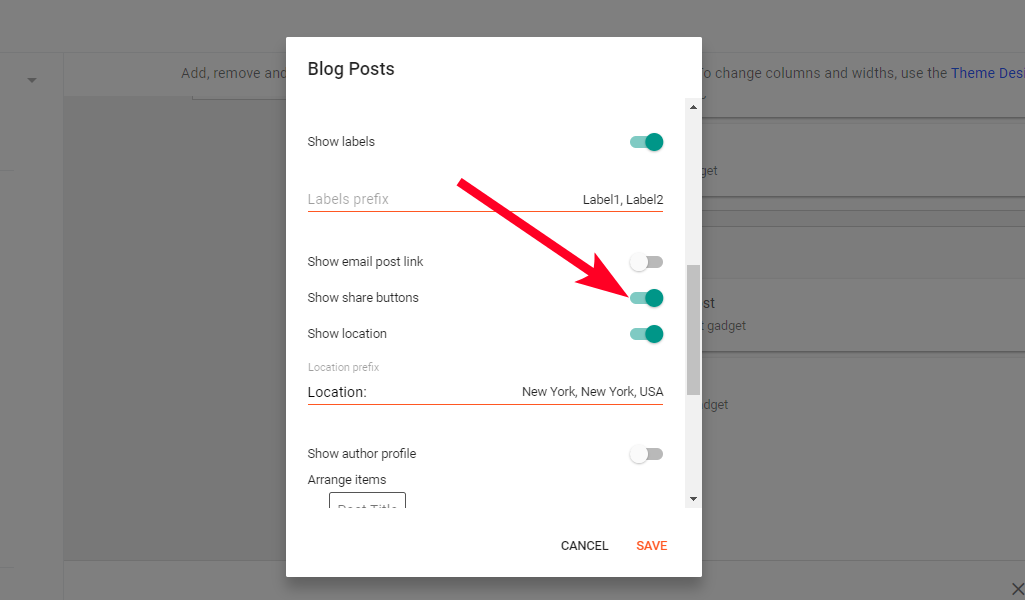
- Scroll down and enable Show share buttons. Save the changes.
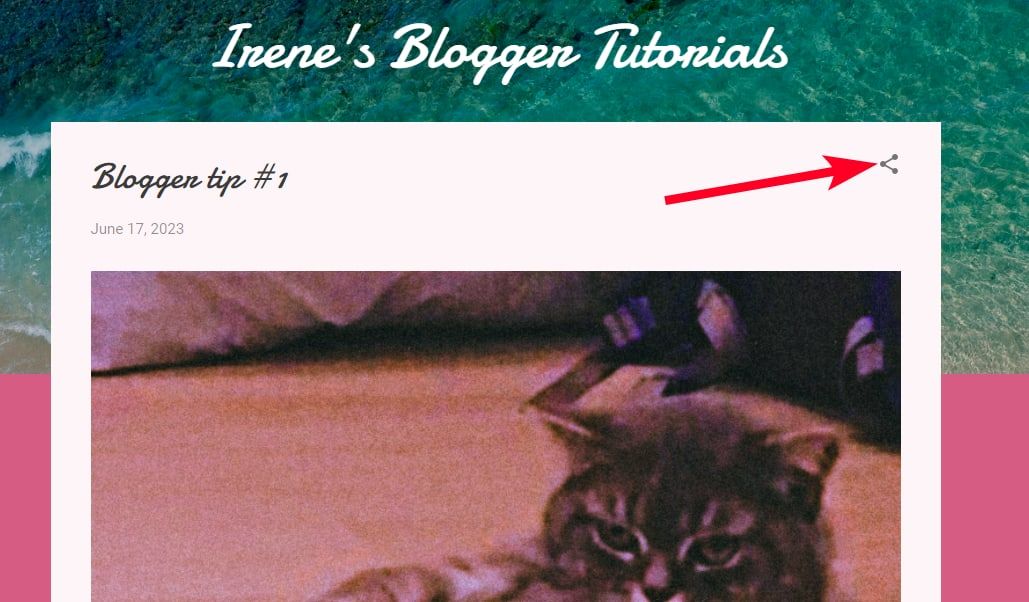
- Visit your blog address.
- Click the share icon beside a post to forward it to Twitter, Facebook, and more.


Other effective ways you can grow your target audience include:
- Start a podcast or feature on one: Podcasts appeal to a set of people that prefer listening to online content rather than reading it. More importantly, you can reach a wider audience on the most popular podcast apps. You can make a post describing each episode, then include the link to the podcast channel.
- Use email marketing: Create email lists to segment your subscribers based on engagement and demographics. This process enables you to send them special offers or newsletters that speak to them on a deeper level.
- Partner with influencers: Micro-influencers can give your blog a shout-out or mention you on their YouTube channels, podcasts, or blog.
Backup and import your blog
No matter the level of security promised on any platform, it’s always a good idea to make a backup. Your backup makes it possible to recover your blog’s data if your account is compromised. Blogger allows you to back up everything locally, including your posts, pages, and comments, as an XML file. This format is common for storing data in a shareable manner between computers and people.
Once you download your Blogger data, you can import it to another account. If you want a copy of your theme, you’ll need to download it separately. Use the following steps to get started.
Backup your Blogger data locally
- Go to the Settings menu from your dashboard.
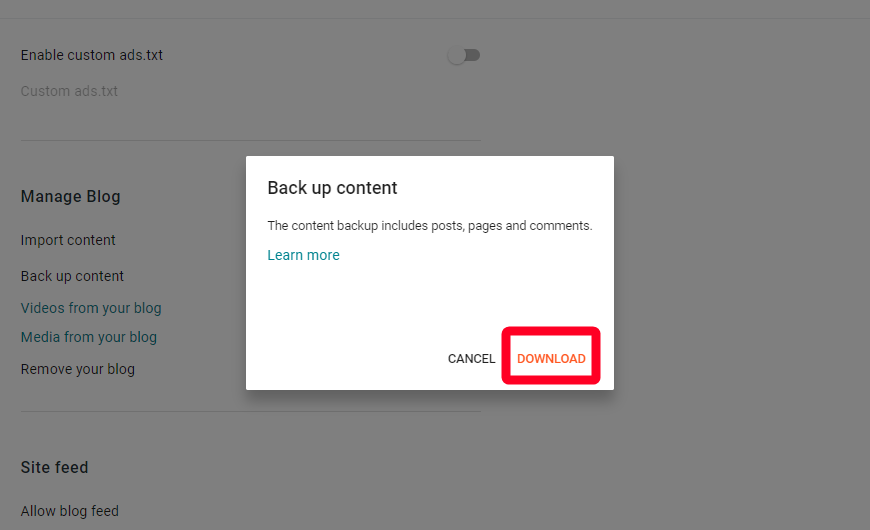
- Scroll down to Manage Blog. Then select Back up content.
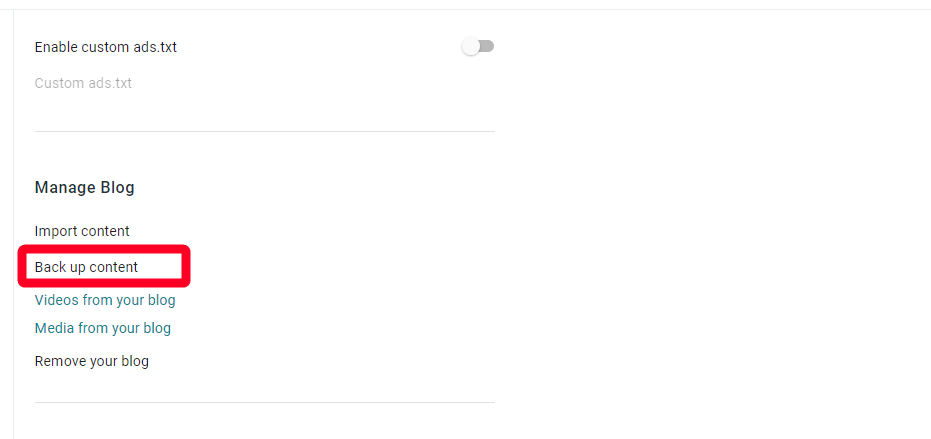
- Click Download. Your browser downloads the XML file.
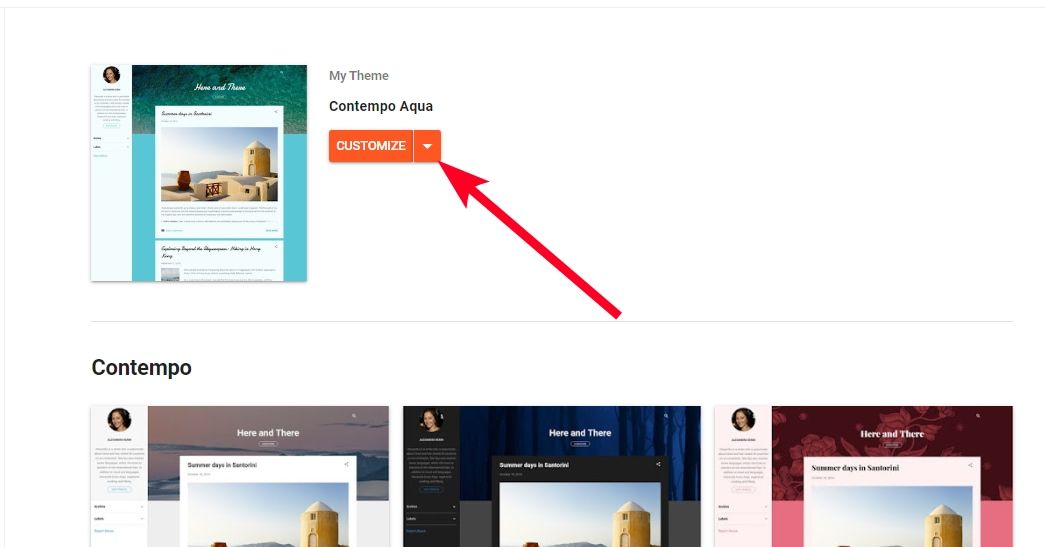
- To back up your theme, go to Theme.
- Click the drop-down arrow beside Customize. Then select Backup.
- Click Download to confirm.


Import your Blogger data to a new account
- Sign in to the Blogger account you want to import your backup to.
- Go to the Settings menu.
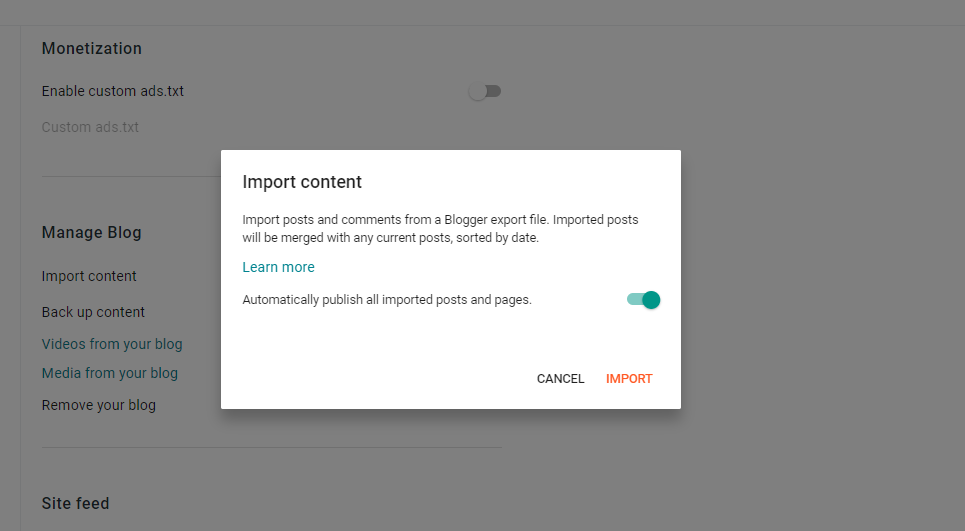
- Scroll down to Manage Blog. Then select Import content.
- Turn off the toggle switch if you don’t want imported posts to publish immediately. Then click Import.
- Choose the XML document from your device’s files.
- The imported data merges with your new account.

Blogger is no WordPress, but it works fine
With free Blogger templates, backup and import features, and integration with Google Analytics, you have more than enough to start a basic blog. The platform is best for beginner bloggers who want to test the waters. There’s not much you can do outside what it already provides.
With the flock of bloggers running to WordPress, you may be worried about the future of your site. Considering how Google discontinues services, you may want to back up your site to cloud storage options. Although the platform only supports downloading an XML copy of your data, you can upload it from your device to the cloud afterward.
[ad_2]
Source link
In the ever-evolving landscape of personal finance, Gen Z is turning to an unexpected place for acquiring financial tricks: TikTok. That’s right, TikTok has emerged as an accessible place to learn financial advice because Gen Z has recognized that many traditional financial tips don’t align with their reality. The platform’s bite-sized videos make it easy for users to consume and understand complex financial concepts quickly. Savvy finance professionals have learned this and are taking to TikTok to provide their insights to young adults, guiding them in areas like budgeting and investment strategies, serving up some unique money habits and financial tricks on the platform. And, hey, it’s not just Gen Z who can benefit from these tips! Let’s dive in and find the best tips the social media platform has to offer.
I’m a Self-Made Millionaire: These Are Investments Everyone Should Avoid During an Economic Downturn
See: How To Build Your Savings From Scratch
Get a Side Hustle
TikTok has popularized the idea of “side hustles” among its Gen Z audience. This is the idea of having multiple income streams to help establish financial security. This can include freelance work, crafting and selling handmade goods, or the lucrative world of affiliate marketing.
“Many TikTokers have demonstrated how to make money on the side, from creating digital content for brands to flipping items for profit,” said Matt Haycox, founder and CEO of Funding Guru. “Gen Zers understand that having multiple sources of income helps create financial freedom and security. This is a great idea but it’s also important for Gen Zers to understand that side hustles that aren’t well thought of and managed can become a burden, rather than an asset.”
I’m a Financial Planning Expert: Here Are 5 Things You Should Never Spend Money on If You Want To Be Rich
Think About Zero-Based Budgeting
TikTok is loaded with tricks to help you save money without giving up on fun. One of these is a zero-based budget, a simple way to manage your money.
“Basically, it means that every penny you make gets assigned a specific purpose, from bills to avocado toast,” said Michael Ryan, financial advisor at Michael Ryan Money.
In this way, you carefully plan where every dollar goes, assigning each dollar to things like groceries, savings or entertainment, and your income minus your expenses equals zero.
“This strategy encourages users to dedicate all their income to predetermined spending categories as well as designated savings goals,” said Donny Gamble, CEO of Retirement Investments. “Many TikTok creators recommend using budget tracking apps to help build a budget that works for their lifestyle.”
Budget With Cash
Another financial trick that more and more Gen Zers are learning from TikTok is how to use cash to create a budget and control their spending.
“One budgeting tip I’ve seen is to withdraw cash in specific amounts to stand for your monthly ‘discretionary’ budget–this way it’s easier to avoid spending over the specific amount, since the only money you have is what’s in your hand,” said Jake Hill, CEO of DebtHammer. “It’s refreshing to see more younger people getting back into the habit of using cash.”
Get a High-Yield Savings Account
“In recent months, the most consistent financial advice I see on TikTok is getting a high-yield savings account–probably because right now, there are many banks offering 5% APY,” said Bethany Hickey, banking and lending expert at Finder.com. “It’s a great, low-risk way to start saving money that doesn’t involve learning anything about investing or require hefty, upfront costs.”
Getting a high-yield savings account is a fantastic idea because it helps your money make more money. With higher interest rates, your savings can grow faster and you’ll see those dollars pile up over time.
Invest via Apps
“Some influencers are also encouraging Gen Zers to save up and invest in the stock market,” Gamble said. “By using apps, users can open an account with minimal fees and receive guidance from experienced investors on which stocks to buy and sell. Additionally, there is content dedicated to teaching viewers about cryptocurrency trading and developing long-term investment plans–both of which have become increasingly popular among younger generations.”
Hickey points to a popular video on TikTok posted by user Robert Croak, who offered three tips to young people: “He recommended getting an e-trader account, investing in index funds, and if you’re interested in real estate, going with Fundrise. Croak also praised the investing app Acorn. Acorn allows you to round up purchases and immediately invest the rounded amount.”
Investing through apps is a great idea because it offers convenience and accessibility, allowing you to easily manage and grow your investments right from your phone.
Always Remember: Take Advice Carefully
With all the advice out there on TikTok, it might be easy to get carried away.
“It’s best to take advice from TikTok with a grain of salt,” Hickey said. “Many influencers and accounts are known to create thinly-veiled advertisements for their products, apps or businesses. A lot of videos are set on hooking viewers in with ‘get rich quick’ schemes like rental arbitrage or drop shipping. It’s also common to get one little bit of advice, only to have the video pitch a paid class or program. The platform is littered with pyramid schemes and sketchy side-gig programs, too. Advice is great, but be on the lookout for videos that heavily promote an app, product, or require you to sign up for something to learn more information.”
“Scammers will often take to social media promising to make you a millionaire. If it sounds too good to be true, it probably is. Instead of trying to follow these schemes, focus on aspects of your finances you can control, like how much debt you take on and how much you put into your retirement savings,” said Mark Henry, founder and CEO of Alloy Wealth Management.
More From GOBankingRates
This article originally appeared on GOBankingRates.com: 5 Money Habits and Financial Planning Tricks Gen Z Is Learning on TikTok
Originally published
[ad_2]
Source link
Losing 50 Pounds in 6 Months: Tips and Tricks To Achieve Your Goal Fitness Volt
[ad_2]
Source link ]]>